
If you’ve been creating content but struggling to rank, long tail keywords might be the missing piece.
This guide is for bloggers, small business owners, and SEO beginners who want real search traffic without competing against giant websites with massive budgets.
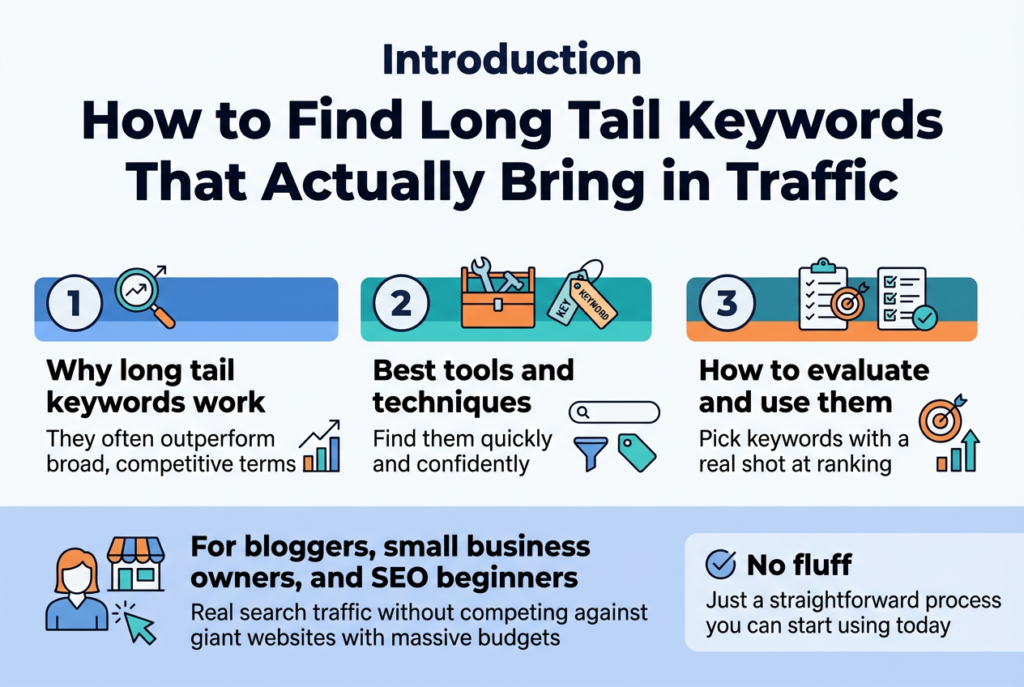
Here’s what we’ll walk through:
- Why long tail keywords work — and why they often outperform broad, competitive terms
- The best tools and techniques to find them quickly and confidently
- How to evaluate and use them so every keyword you pick has a real shot at ranking
No fluff — just a straightforward process you can start using today.
Understand Why Long Tail Keywords Drive Better Results
Discover How Long Tail Keywords Boost Conversion Rates
When someone types “shoes” into Google, they’re probably just browsing. But when someone searches “women’s waterproof hiking boots size 8 wide fit,” they’re ready to buy. That’s the magic of long tail keywords — they capture people who already know what they want.
Long tail keywords are highly specific search phrases, usually three to six words long, that reflect a searcher’s clear intent. Because these people are further along in their decision-making journey, they’re far more likely to take action — whether that’s making a purchase, signing up for a service, or downloading a resource.
Here’s a quick look at how specificity impacts buyer intent:
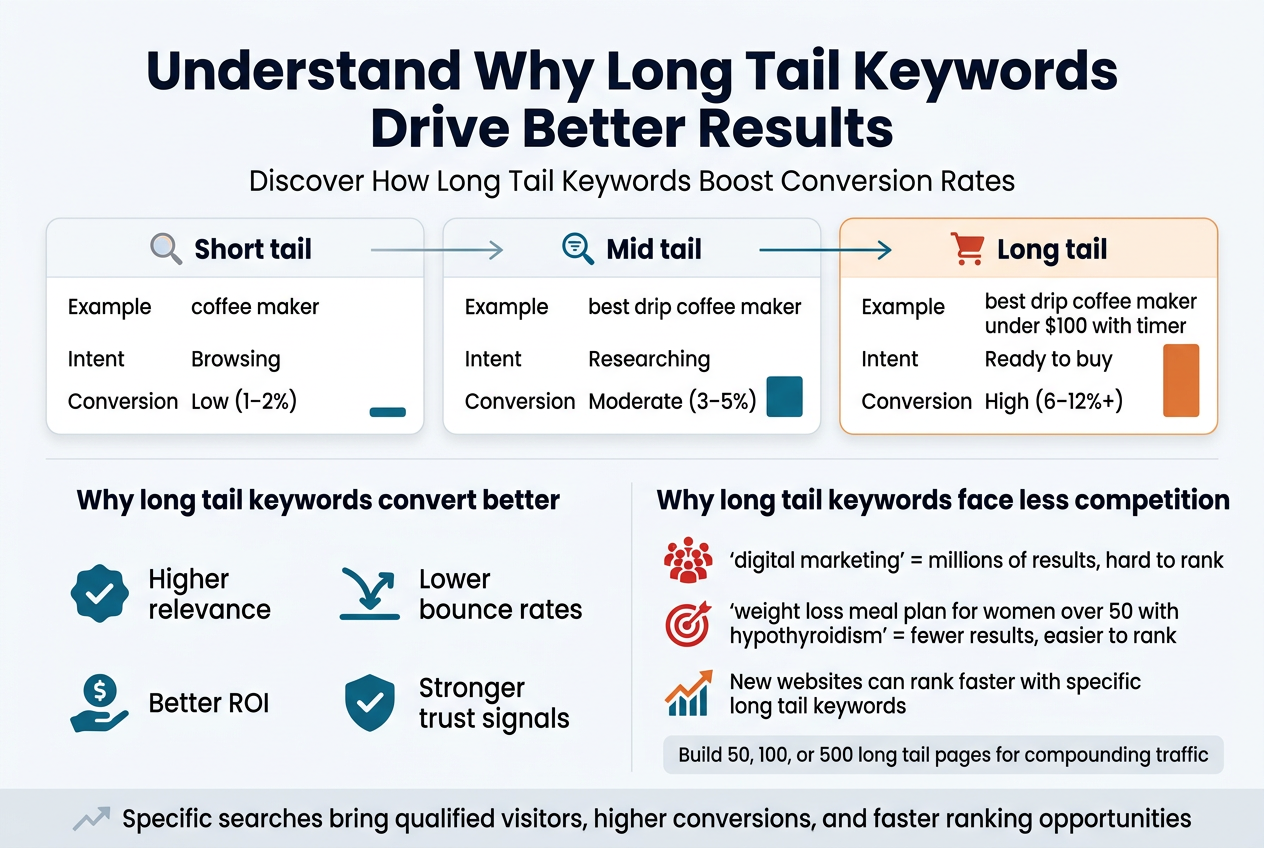
| Keyword Type | Example | Search Intent | Typical Conversion Rate |
|---|---|---|---|
| Short tail | “coffee maker” | Browsing | Low (1–2%) |
| Mid tail | “best drip coffee maker” | Researching | Moderate (3–5%) |
| Long tail | “best drip coffee maker under $100 with timer” | Ready to buy | High (6–12%+) |
The numbers tell a clear story. Visitors landing on your page through long tail searches already have their wallets out, mentally speaking. They’ve done the research, narrowed down their options, and just need the right page to confirm their choice.
This is why even a page ranking for a low-volume long tail keyword can generate more actual revenue than a page ranking on page three for a high-volume short term. You’re fishing in a smaller pond, but that pond is full of hungry fish.
- Higher relevance means your content directly answers what the reader is looking for
- Lower bounce rates because visitors find exactly what they came searching for
- Better ROI since you’re attracting qualified traffic rather than window shoppers
- Stronger trust signals as your content matches the searcher’s specific need
Think about your own search habits. When you’re just curious, you search broadly. When you’re serious, your search gets specific. Your potential customers are no different.
Learn Why Long Tail Keywords Face Less Competition
Short tail keywords are a bloodbath. Trying to rank for “digital marketing” means going head-to-head with HubSpot, Neil Patel, Moz, and dozens of other established giants with teams of content writers and years of domain authority built up. For most websites, that’s a fight you simply can’t win quickly.
Long tail keywords flip that equation completely. Because they’re so specific, fewer websites bother targeting them directly. This creates a wide open lane for smaller websites, newer blogs, and niche businesses to rank on page one — sometimes without even building a single backlink.
Here’s why the competition is naturally lower:
- Smaller search volume means most big brands don’t see these terms as worth chasing
- High specificity makes it harder for generic content to naturally cover the topic
- Less commercial intent signals on many long tail terms reduce paid ad competition too
- Niche audiences are often too focused for mass-market content creators to cater to
This creates a real opportunity. A new website can realistically rank in the top three positions for a well-chosen long tail keyword within weeks, while ranking for a broad term might take years — if it ever happens at all.
A practical way to think about it:
Competing for “weight loss” → Millions of results, dominated by WebMD, Healthline, government health sites. Your brand-new fitness blog has virtually zero chance.
Competing for “weight loss meal plan for women over 50 with hypothyroidism” → Dozens of results, most of them forum threads or loosely relevant articles. A focused, well-written piece can rank comfortably here.
The compound effect of this strategy is massive. Instead of chasing one impossible keyword, you build a library of 50, 100, or even 500 long tail pages. Each one brings in a small but steady stream of highly targeted visitors. Add those streams together and you’ve got serious organic traffic — built on solid, achievable rankings rather than wishful thinking.
Long tail keywords also give you a much faster feedback loop. You can publish a piece today and see meaningful ranking movement within a few weeks, which lets you learn, adjust, and grow much faster than if you were grinding away at competitive head terms with no results to show for months.
Use Powerful Tools to Uncover Profitable Long Tail Keywords
A. Leverage Google Keyword Planner for Free Keyword Ideas
Google Keyword Planner is one of the most underrated tools in any SEO toolkit, mostly because people assume it’s only useful for running Google Ads. The truth? It’s a goldmine for discovering long tail keywords, and it won’t cost you a single dollar to use.
Getting Started With Google Keyword Planner
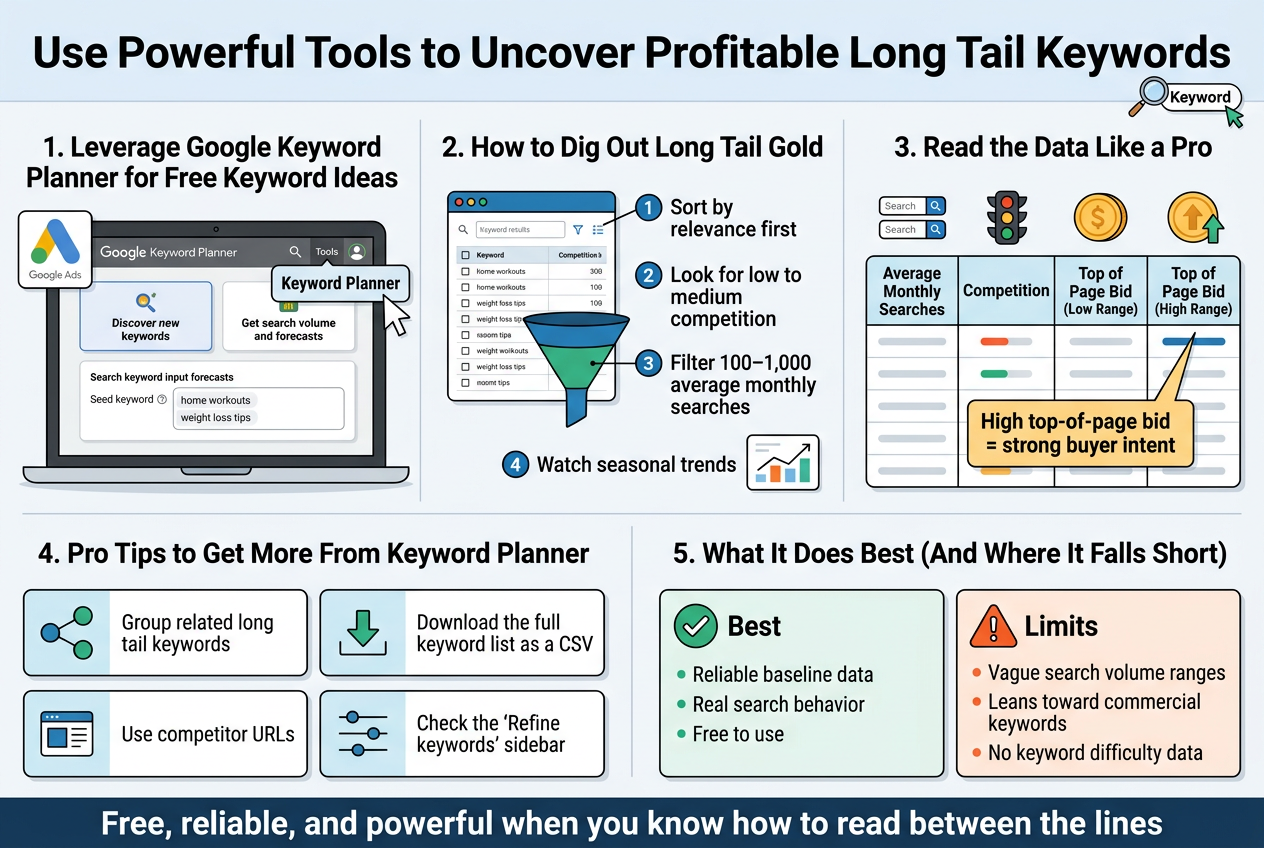
To access it, you’ll need a Google Ads account. Don’t worry — you don’t have to spend any money on ads. Just create an account, skip the campaign setup, and head straight to the Keyword Planner inside the Tools menu.
Once you’re in, you’ll see two main options:
- Discover new keywords — This is where the magic happens for long tail research
- Get search volume and forecasts — Useful when you already have a list and want data on it
Start by typing in a broad seed keyword related to your niche. For example, if you’re in the fitness space, type something like “home workouts” or “weight loss tips.”
How to Dig Out Long Tail Gold
After hitting search, Google will spit out hundreds of keyword suggestions. Here’s where most people go wrong — they immediately filter for high-volume keywords and ignore everything else. Flip that approach completely.
What you actually want to do:
- Sort by relevance first, not search volume
- Look for keywords with low to medium competition — these are often long tail phrases hiding in plain sight
- Filter by average monthly searches between 100–1,000 — this sweet spot often reveals highly specific, intent-driven phrases
- Pay attention to seasonal trends using the graph feature next to each keyword
Reading the Data Like a Pro
Google Keyword Planner shows you four key columns for each keyword:
| Column | What It Tells You |
|---|---|
| Average Monthly Searches | How many people search this per month |
| Competition | How many advertisers are bidding (Low/Medium/High) |
| Top of Page Bid (Low Range) | Minimum cost advertisers pay — signals commercial intent |
| Top of Page Bid (High Range) | Maximum bid — higher bids = more buyer intent |
That bid range column is sneaky valuable. If a long tail keyword has a high top-of-page bid, advertisers are spending serious money to show up for it. That tells you people searching that phrase are ready to take action — buy something, book a service, or download something. Targeting those keywords in your content means you’re attracting visitors with real intent, not just browsers.
Pro Tips to Get More From Keyword Planner
- Group related long tail keywords together — Google often clusters phrases by theme, making it easy to build a content cluster around one topic
- Download the full keyword list as a CSV and sort it in Excel or Google Sheets — you’ll spot patterns that aren’t obvious inside the tool
- Use competitor URLs in the “Start with a website” option to pull keywords that already drive traffic to similar sites in your space
- Check the “Refine keywords” sidebar on the left — it breaks results down by brand vs. non-brand, specific features, and more, helping you narrow into hyper-specific long tail phrases fast
What Google Keyword Planner Does Best (And Where It Falls Short)
Keyword Planner is brilliant for getting a baseline — especially when you need data straight from the source that actually powers Google Search. The keyword suggestions are pulled directly from real search behavior, so you know the data is reliable.
That said, it does have some limitations:
- Search volume ranges can be vague — especially if you’re not running active ad campaigns, you’ll often see broad ranges like “1K–10K” instead of exact numbers
- It leans toward commercial keywords since it’s built for advertisers, so some informational long tail phrases might get less attention
- It won’t show you keyword difficulty from an SEO standpoint — you’ll need to pair it with another tool for that
Even with these gaps, Google Keyword Planner remains one of the best starting points for building a long tail keyword list. It’s free, it’s reliable, and when you know how to read between the lines, it reveals opportunities that most of your competitors are completely overlooking.
Apply Smart Research Techniques to Find Winning Keywords
![Create a full-bleed professional infographic illustration in a 3:2 aspect ratio, with a clean modern SEO/marketing style, white background, dark navy text, teal and blue accents, and subtle yellow highlight details. Use a wide horizontal layout with two large main sections side by side, not a vertical poster.
Top header across the full width:
Large bold title in dark navy: "Apply Smart Research Techniques to Find Winning Keywords"
Small subtitle below in gray: "Find long tail keyword opportunities with Google Autocomplete and Google Search Console"
Left wide section titled with a blue magnifying glass icon:
"1. Mine Google Autocomplete for Instant Keyword Ideas"
Include a simple Google search bar graphic with typed text: "running shoes"
Show a dropdown autocomplete list beneath it with 4 suggestions in pill-shaped rows:
"running shoes arch support"
"running shoes for flat feet"
"running shoes wide toe box"
"running shoes bunions"
Add small letter chips beside the search bar: "a" "f" "w" "b"
Add a small row of modifier chips: "for" "without" "near me" "vs" "how to"
Under this, include a compact callout box with a star icon and the text:
"Related searches"
"Who, What, When, Where, Why, How"
"Is [keyword] worth it"
"Can [keyword] cause..."
"How long does [keyword] take"
Add a small note line in gray:
"Use autocomplete and related searches to uncover real long tail keywords"
Right wide section titled with a green Google Search Console dashboard icon:
"2. Use Google Search Console to Find Existing Keyword Gaps"
Show a simplified analytics dashboard card with a left sidebar label: "Performance"
A top filter bar with text:
"Date range: Last 3–6 months"
"Queries"
Display a table with columns:
"Query" "Impressions" "Clicks" "CTR" "Avg. Position"
Include 3 example rows exactly:
"best protein powder for women over 40 | 4,200 | 38 | 0.9% | 14.2"
"protein powder without artificial sweeteners | 3,100 | 22 | 0.7% | 18.5"
"how much protein powder per day | 6,800 | 91 | 1.3% | 11.7"
Add a highlighted filter chip row beneath the table:
"Position > 5"
"Position < 30"
"Impressions > 100"
Add a small page-and-queries mini panel showing:
"One page"
"40–60 keyword phrases"
Add a decision box with three colored arrows and exact text:
"Positions 5–15: Update content, refresh title tag, add internal links"
"Positions 15–30: Write a more comprehensive version or build backlinks"
"No dedicated page: Create new content for the exact query"
Bottom footer bar across the full width with a bold takeaway line and a lightbulb icon:
"Real data beats guesswork"
Smaller line below:
"Google Autocomplete shows what people search. Google Search Console shows what already brings traffic."
Use clean sans-serif fonts, strong visual hierarchy, crisp icons, organized blocks, clear spacing, and balanced wide composition.](https://gravitywrite.sgp1.digitaloceanspaces.com/blog/img_4450412_2026_06_21_16_43_56.jpg)
Mine Google Autocomplete for Instant Keyword Ideas
Google Autocomplete is one of the most underrated free tools sitting right under your nose. Every time someone starts typing a query into Google, the search engine predicts what they’re looking for based on real searches from real people. That prediction engine is a goldmine for long tail keyword ideas.
Here’s how to squeeze the most out of it:
Start with a broad seed keyword and go deep:
- Type your seed keyword into Google, but don’t hit Enter
- Watch the dropdown suggestions appear — those are actual search terms people use
- Add letters at the end of your keyword (a, b, c… or 1, 2, 3) to uncover more variations
- Add words like “for,” “without,” “near me,” “vs,” or “how to” before or after your keyword
Try the alphabet trick systematically:
| Base Keyword | Letter Added | Suggestion Example |
|---|---|---|
| running shoes | + “a” | running shoes arch support |
| running shoes | + “f” | running shoes for flat feet |
| running shoes | + “w” | running shoes wide toe box |
| running shoes | + “b” | running shoes bunions |
Each of those suggestions represents a real question or need that someone searched for. They’re specific, they carry intent, and they’re much easier to rank for than broad terms like “running shoes.”
Don’t stop at the first page of results. Scroll to the bottom of the Google search results page and check the “Related searches” section. This area gives you a whole new cluster of keyword ideas that branch out from your original search. It often surfaces angles you wouldn’t have thought of on your own.
Use question modifiers to find informational long tail keywords:
- Who, What, When, Where, Why, How
- “Is [keyword] worth it”
- “Can [keyword] cause…”
- “How long does [keyword] take”
Tools like AnswerThePublic and AlsoAsked pull directly from these autocomplete signals at scale, so if you want to do this research faster, they’re worth bookmarking. But even doing it manually inside Google gives you immediate, actionable keyword ideas in minutes.
Use Google Search Console to Find Existing Keyword Gaps
If you already have a website with some content on it, Google Search Console (GSC) is sitting on a treasure chest of long tail keyword data you’re probably ignoring. This tool shows you exactly what search queries are bringing people to your site — and more importantly, the keywords where you’re showing up but not quite ranking well enough to drive real traffic.
Setting up your keyword gap analysis in GSC:
- Log into Google Search Console
- Click on Performance in the left sidebar
- Set the date range to the last 3–6 months for a solid data sample
- Click on the Queries tab to see what search terms your site appears for
Now here’s where it gets interesting.
Look for keywords with high impressions but low clicks. These are queries where Google is already showing your content in results, but searchers aren’t clicking through. That usually means one of two things: your page isn’t ranking high enough (positions 5–20), or your title and meta description aren’t compelling enough to earn the click.
Sort your queries by impressions and look for this pattern:
| Query | Impressions | Clicks | CTR | Avg. Position |
|---|---|---|---|---|
| best protein powder for women over 40 | 4,200 | 38 | 0.9% | 14.2 |
| protein powder without artificial sweeteners | 3,100 | 22 | 0.7% | 18.5 |
| how much protein powder per day | 6,800 | 91 | 1.3% | 11.7 |
All three of these are long tail keywords your site already has some traction on. With a bit of targeted optimization — updating the content, improving the title tag, adding more depth to the page — you can push those rankings up and dramatically increase clicks without creating brand new content.
Filters to make this process faster:
- Filter by Position > 5 and Position < 30 to find keywords in the “almost there” zone
- Filter by Impressions > 100 to focus only on queries with real search volume
- Export the data to a spreadsheet and sort by impressions to prioritize your effort
Check for pages that rank for dozens of long tail variations. Sometimes a single blog post ranks for 40–60 different keyword phrases. Use the Pages tab in GSC, click on a specific URL, and then switch to the Queries view to see all the terms that page ranks for. This tells you which topics naturally attract long tail traffic and gives you ideas for new content that covers related subtopics in more depth.
What to do once you spot a keyword gap:
- If the page ranks between positions 5–15: Update the existing content, refresh the title tag, and add internal links pointing to that page
- If the page ranks between positions 15–30: Consider writing a more comprehensive version of the content or building a few relevant backlinks to it
- If a keyword shows impressions but you don’t have a dedicated page for it: Create a new piece of content targeting that exact query
GSC takes the guesswork out of long tail keyword research by showing you real data from your actual audience. Instead of building a strategy on assumptions, you’re working with evidence of what people are already looking for when they find you — and that’s a massive head start.
Integrate Long Tail Keywords Strategically Into Your Content
Place Keywords Naturally in Titles and Headings
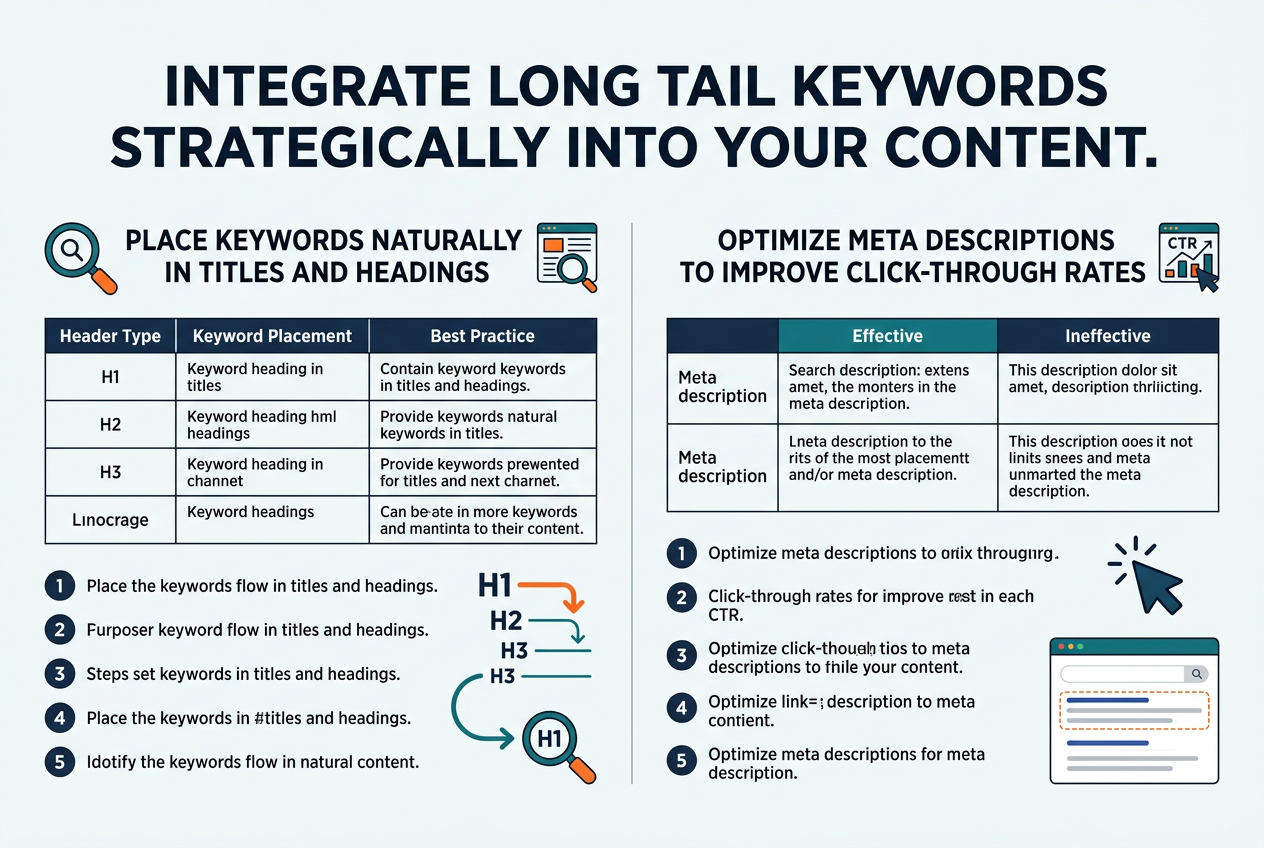
Getting your long tail keywords into titles and headings is one of the most powerful moves you can make — but only when it feels natural. Forcing a keyword into a heading just to tick a box actually works against you. Readers notice when something sounds awkward, and search engines are smart enough to catch keyword stuffing too.
The goal is to write headings that serve two masters at once: the human reader and the search algorithm. The good news is that long tail keywords are often already conversational phrases, which makes them easier to weave in without sounding robotic.
Practical Tips for Title and Heading Optimization
- Lead with the keyword when possible. Search engines give extra weight to words that appear early in a title. If your long tail keyword is “best running shoes for flat feet,” starting your title with that phrase is stronger than burying it at the end.
- Match search intent in your heading. A heading like “How to Find Running Shoes for Flat Feet on a Budget” tells both the reader and Google exactly what the content covers.
- Use variations across subheadings. You don’t need to repeat the exact keyword in every heading. Spread related phrases across your H2s and H3s to build topical relevance without sounding repetitive.
- Keep headings readable out of context. Someone skimming your post should understand each heading on its own. Clear headings that include your keyword naturally do double duty.
- Test your titles before publishing. Tools like CoSchedule Headline Analyzer or even just reading your title out loud can tell you whether it sounds natural or forced.
Here’s a quick comparison showing the difference between a forced keyword placement and a natural one:
| Approach | Example |
|---|---|
| Forced / unnatural | “Flat Feet Running Shoes Best for People Who Run” |
| Natural and optimized | “Best Running Shoes for Flat Feet That Won’t Break the Bank” |
| Keyword buried too late | “A Complete Guide to Footwear, Including the Best Running Shoes for Flat Feet” |
| Balanced and clear | “How to Choose the Best Running Shoes for Flat Feet” |
The natural versions feel like something a real person would say or search for. That alignment between what people type and what you write is where the magic happens.
Optimize Meta Descriptions to Improve Click-Through Rates
Your meta description doesn’t directly impact your ranking in most cases, but it absolutely affects whether someone clicks your link or scrolls past it. Think of it as your 30-second pitch in the search results. You have around 150–160 characters to convince someone that your page has exactly what they’re looking for.
Long tail keywords belong in your meta description because they often appear bolded in search results when they match what the user typed. That visual highlight draws the eye and signals relevance instantly.
What a Strong Meta Description Looks Like
A well-optimized meta description does three things:
- Includes the long tail keyword naturally — not jammed in awkwardly, but woven into a sentence that makes sense.
- Speaks directly to the reader’s problem or desire — it answers the implicit question: “Why should I click this result?”
- Ends with a soft call to action — something like “Find out how,” “See the full list,” or “Get started today.”
Common Mistakes to Avoid
- Leaving the meta description blank. When you don’t write one, Google pulls random text from your page, which is usually not compelling or keyword-rich.
- Repeating the title word for word. The description should add new information, not just echo the headline.
- Going over the character limit. Anything beyond ~160 characters gets cut off with an ellipsis, which can make your snippet look incomplete and unprofessional.
- Being vague. Phrases like “Click here to learn more about this topic” tell the reader nothing. Be specific about what they’ll get.
Before and After Examples
| Version | Meta Description |
|---|---|
| Weak | “This article talks about running shoes and foot problems.” |
| Strong | “Struggling with flat feet? Discover the best running shoes for flat feet that offer real arch support and all-day comfort.” |
| Weak | “We have information about long tail keywords on this page.” |
| Strong | “Learn how to find long tail keywords that bring in targeted traffic — with free tools and step-by-step techniques you can use today.” |
The strong versions feel personal, specific, and useful. They speak to a real pain point and promise a clear outcome.
One More Thing Worth Doing
Once you’ve written your meta description, read it the way a tired, distracted person might. Does it immediately make sense? Does it make you want to click? If you have to read it twice to understand what the page is about, rewrite it. Clarity always wins over cleverness in search snippets.

Long tail keywords are a game-changer for anyone serious about driving the right traffic to their content. They help you connect with people who already know what they want, making it easier to rank, convert, and grow without battling giants in your niche. From using the right tools to digging into smart research techniques and picking keywords that actually deliver value, every step in this process brings you closer to content that truly performs.
Start small if you need to. Pick a handful of strong long tail keywords, weave them naturally into your content, and watch what happens. The more you practice spotting and using these hidden gems, the better your results will get over time. Give it a shot, and you might be surprised at just how much the right keywords can shift things in your favor.
