
1. What Is SEO On-Page Optimization?
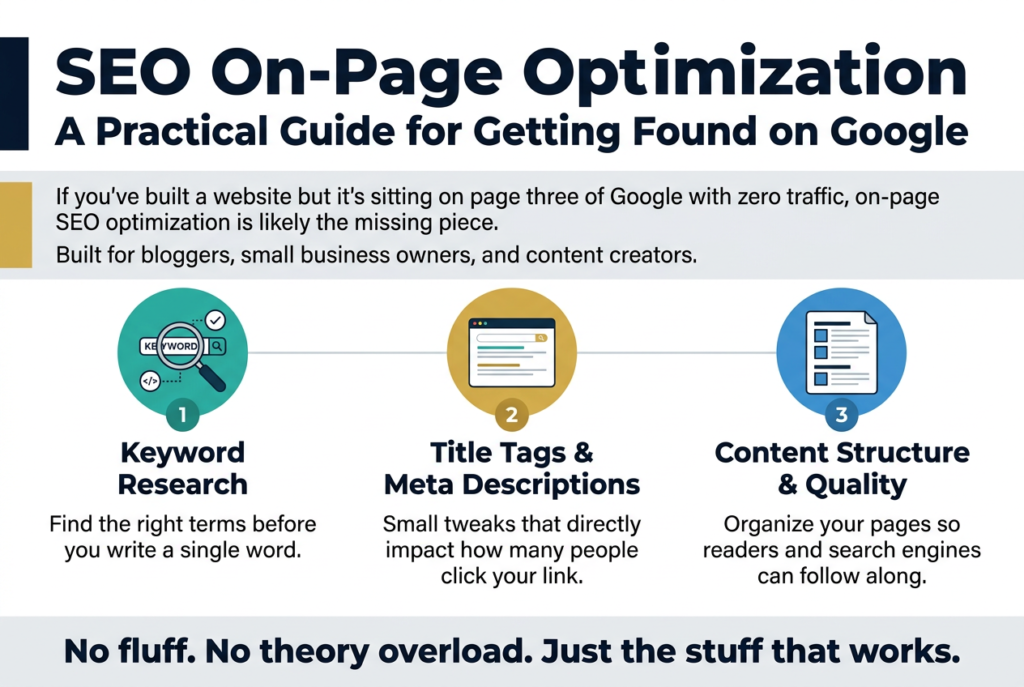
If you have ever wondered why some web pages show up at the top of Google while others are buried on page five, the answer often comes down to SEO on page optimization. It is the process of making changes directly on your website so that search engines like Google can understand what your content is about — and rank it higher for the right searches.
Think of it this way: you have written a great article, but if Google cannot figure out what it is about, it will not show it to the people searching for that topic. On-page SEO is how you make sure Google understands your content clearly and rewards you with better rankings.
Unlike off-page SEO, which involves things happening outside your website like backlinks, on-page SEO is entirely in your control. You can make changes today and start seeing results over time. That is what makes it one of the most practical and beginner-friendly parts of search engine optimization.
Whether you run a blog, an e-commerce store, or a business website, learning how to do proper on-page SEO is one of the smartest things you can do to grow your organic traffic.
2. On-Page SEO Full Form and Basic Meaning {#on-page-seo-full-form}
The on-page SEO full form is simply On-Page Search Engine Optimization. The term “on-page” refers to everything that lives on a single webpage — the text, the images, the HTML code, the links, and more.
Search Engine Optimization (SEO) is the overall practice of improving a website so it shows up higher in search engine results pages (SERPs). On-page SEO is the part of that practice that focuses on what is inside each individual page.
Here is a quick breakdown of what the term means:
- On-Page = Happening directly on your webpage
- SEO = The process of making pages more visible in search results
- Optimization = Improving something to make it work better
So put together, on-page SEO optimization means making improvements directly on your webpage to help it rank better in search results. It covers everything from your page title and headings to your content quality, keyword usage, images, and internal links.
3. Why On-Page SEO Is Important {#why-on-page-seo-is-important}
Understanding why on-page SEO is important is the first step to taking it seriously. Here are the key reasons it matters so much:
It Helps Google Understand Your Content
Google uses automated programs called crawlers to read your web pages. When you optimize your page properly — with clear headings, relevant keywords, and a logical structure — you are making it easier for Google to understand what the page is about. The easier it is for Google to understand, the better your chances of ranking.
It Directly Affects Your Search Rankings
On-page SEO signals are among the strongest ranking factors Google uses. Things like your title tag, meta description, content quality, and keyword placement all play a direct role in where your page shows up in search results.
It Improves User Experience
Good on-page SEO does not just help search engines — it also makes your pages easier and more enjoyable for real people to use. When content is well-structured with clear headings, short paragraphs, and helpful information, visitors stay on the page longer. This reduces your bounce rate, which is another positive signal for Google.
It Works Together with Off-Page SEO
Even if you have hundreds of backlinks pointing to your website, poor on-page SEO can hold you back. Think of on-page and off-page SEO as two legs of the same body — you need both working well to move forward.
It Gives You a Competitive Edge
If two websites are competing for the same keyword, the one with better on-page optimization will almost always win. Even a few small improvements — like a more relevant title tag or better use of headings — can push your page above a competitor.
Quick Tip: Businesses that invest in on-page SEO consistently see better organic traffic over time compared to those that rely only on paid ads. It is a long-term strategy that keeps paying off.
4. Elements of On-Page SEO {#elements-of-on-page-seo}
The elements of on-page SEO are the individual components you need to optimize on every page of your website. Let us go through each one in detail.
4.1 Title Tag
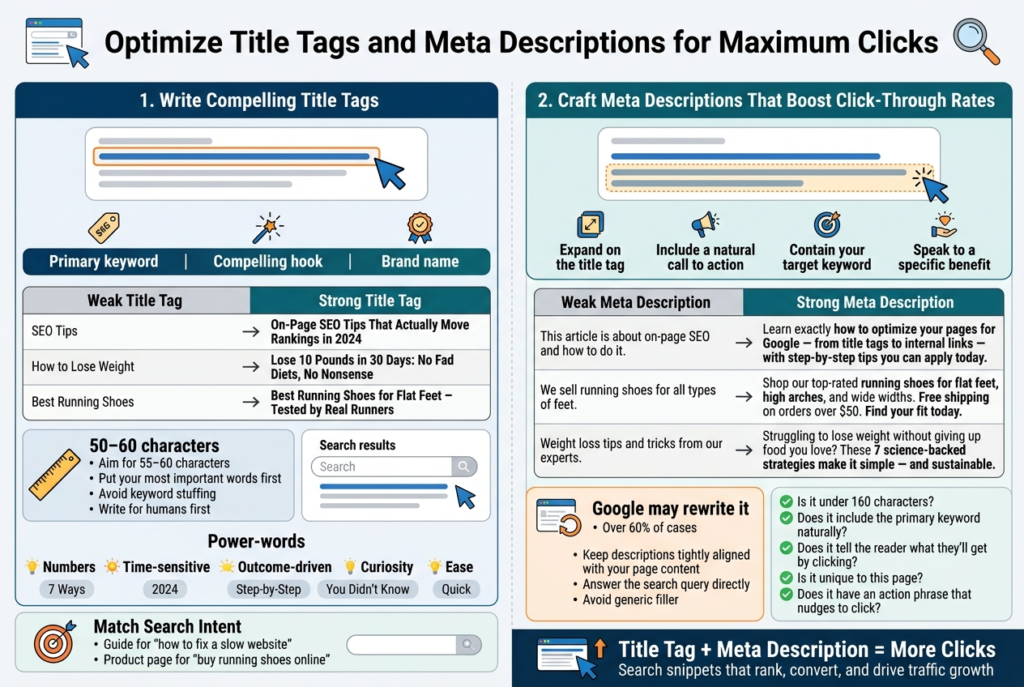
The title tag is the clickable headline that appears in Google search results. It is one of the most important on-page SEO elements. Every page should have a unique title tag that:
- Includes your primary keyword
- Is between 50–60 characters long
- Is clear and tells people what the page is about
- Encourages people to click
Example: Instead of “Welcome to Our Website,” use “Affordable Running Shoes for Men — Free Shipping | ShopName”
4.2 Meta Description
The meta description is the short paragraph that appears below your title in search results. While it is not a direct ranking factor, it plays a big role in getting people to click your link.
- Keep it between 150–160 characters
- Include your primary keyword naturally
- Write it like a mini advertisement for your page
- Make it informative and helpful
4.3 Headings (H1, H2, H3…)
Headings help both readers and search engines understand the structure of your content. The H1 tag is your main page title and should appear only once per page. H2 and H3 tags are used for subheadings throughout the content.
- Use your primary keyword in the H1
- Use related keywords naturally in H2 and H3 tags
- Make headings descriptive and relevant
- Do not use headings just for styling — use them to organize your content
4.4 URL Structure
Your URL (the web address of the page) should be short, clean, and include your main keyword.
- Good URL: yoursite.com/on-page-seo-optimization
- Bad URL: yoursite.com/p=12345?category=blog&id=97
Keep URLs lowercase, use hyphens instead of underscores, and avoid unnecessary words.
4.5 Keyword Placement and Density
While you should not stuff your content with keywords, using your primary and related keywords in the right places is important.
Key places to include your primary keyword:
- In the first 100 words of your content
- In the title tag
- In the meta description
- In at least one H2 or H3 heading
- Naturally throughout the body content
- In the image alt text
Aim for natural usage — if it sounds forced or awkward, rephrase it.
4.6 Content Quality and Length
Google loves content that is helpful, accurate, and covers a topic in depth. Longer content tends to rank better, but only when it is actually useful. Thin content (pages with very little valuable information) will struggle to rank.
Tips for great content:
- Answer the questions your audience is actually asking
- Cover the topic thoroughly without unnecessary filler
- Use real examples, data, and practical advice
- Keep sentences and paragraphs short and easy to read
- Update content regularly to keep it fresh and accurate
4.7 Image Optimization
Images make your content more engaging, but they also need to be optimized.
- Use descriptive file names (e.g.,
on-page-seo-checklist.jpginstead ofimg001.jpg) - Add alt text that describes the image and includes a keyword where relevant
- Compress images to reduce file size and improve page loading speed
- Use modern formats like WebP where possible
4.8 Internal Links
Internal links connect different pages on your website. They help users navigate your site and help Google discover and understand more of your content.
- Link to relevant pages within your content
- Use descriptive anchor text (the clickable text of the link)
- Avoid linking with generic text like “click here”
- Make sure all internal links work and go to live pages
4.9 Page Speed
How fast your page loads is a confirmed ranking factor for Google. A slow page frustrates users and hurts your rankings.
- Use tools like Google PageSpeed Insights to check your speed
- Compress images
- Use a fast hosting provider
- Minimize unnecessary code and scripts
4.10 Mobile Friendliness
More than half of all web searches happen on mobile devices. Google uses mobile-first indexing, which means it primarily looks at your mobile version when deciding rankings.
- Use a responsive design that adjusts to any screen size
- Make sure buttons and links are easy to tap on a small screen
- Avoid pop-ups that cover the entire screen on mobile
- Test your pages using Google’s Mobile-Friendly Test
5. Types of On-Page SEO {#types-of-on-page-seo}
When people talk about the types of on-page SEO, they generally divide it into three main areas: content SEO, technical on-page SEO, and HTML SEO. Let us look at each one.
5.1 Content SEO
This covers everything related to the written and visual content on your page:
- Keyword research and usage
- Content quality and depth
- Readability and structure
- Use of images, videos, and infographics
- Answering user intent (what people actually want to find)
Content SEO is about making sure your page gives searchers exactly what they are looking for.
5.2 Technical On-Page SEO
This covers the behind-the-scenes elements that affect how search engines read and understand your page:
- Page loading speed
- Mobile responsiveness
- Core Web Vitals (Google’s set of performance metrics)
- Structured data / schema markup
- Canonical tags (to avoid duplicate content issues)
- Secure HTTPS connection
5.3 HTML SEO
This focuses on the code elements of your page:
- Title tags
- Meta descriptions
- Header tags (H1, H2, H3)
- Alt text for images
- URL structure
- Open Graph tags (for social sharing)
All three types work together. Ignoring any one of them means leaving ranking opportunities on the table.
6. On-Page SEO vs Off-Page SEO Factors {#on-page-seo-vs-off-page-seo}
A common question people have is: what is the difference between on-page and off-page SEO? Here is a clear comparison.
| Factor | On-Page SEO | Off-Page SEO |
|---|---|---|
| Where it happens | On your website | Outside your website |
| Control level | Fully in your control | Partly in your control |
| Examples | Title tags, content, images | Backlinks, social signals, brand mentions |
| Main goal | Help search engines understand your content | Build your website’s authority and trust |
Key Off-Page SEO Factors to Know
While this guide focuses on on-page SEO, it helps to understand what off-page SEO factors involve:
- Backlinks: Links from other websites pointing to yours. Quality matters more than quantity.
- Brand mentions: When other websites mention your brand name, even without a link.
- Social signals: Shares, likes, and engagement on social media platforms.
- Guest posting: Writing articles for other websites that link back to yours.
- Online reviews: Positive reviews on Google, Yelp, and other platforms can influence local SEO.
The important thing to remember is that on-page SEO creates the foundation. Without it in place, off-page efforts like link building will not be as effective.
7. On-Page SEO Examples You Can Learn From {#on-page-seo-examples}
Looking at real on-page SEO examples is one of the fastest ways to understand what good optimization looks like in practice.
Example 1: A Blog Post on a Cooking Website
Topic: How to make homemade pasta
Good on-page SEO practices used:
- Title tag: “How to Make Homemade Pasta from Scratch (Easy Recipe)”
- H1: Same as or similar to the title
- H2s: Ingredients You Need, Step-by-Step Instructions, Tips for Perfect Pasta, Storing Leftover Pasta
- First paragraph mentions “homemade pasta” naturally
- Images of each step with descriptive alt text
- Internal links to related recipes on the same site
- Fast loading page with compressed images
Example 2: A Product Page on an E-Commerce Store
Topic: Selling noise-canceling headphones
Good on-page SEO practices used:
- Title tag includes the brand, model, and keyword: “Sony WH-1000XM5 Noise Canceling Headphones — Buy Online”
- Meta description highlights key benefits and a call to action
- Product description uses keywords naturally without stuffing
- High-quality product images with alt text like “Sony noise canceling headphones side view”
- Customer reviews on the page (adds fresh content and trust)
- Schema markup for product rating and price
Example 3: A Local Business Page
Topic: A plumber in Chicago
Good on-page SEO practices used:
- Title tag: “Emergency Plumber in Chicago — Available 24/7 | ABC Plumbing”
- Content mentions the service area multiple times naturally
- Google Maps embed on the contact page
- NAP (Name, Address, Phone Number) clearly listed
- Local schema markup added
- Internal links to service pages (drain cleaning, water heater repair, etc.)
8. What Backlinko Says About On-Page SEO {#on-page-seo-backlinko}
Backlinko, run by SEO expert Brian Dean, is one of the most respected SEO resources on the internet. Their research and guides on on-page SEO are widely referenced by SEO professionals around the world.
Here are some of the key takeaways from Backlinko’s approach to on-page SEO:
Focus on Search Intent First
Backlinko emphasizes that before you do anything else, you need to understand the search intent behind a keyword. Search intent means understanding what the person typing a query actually wants — information, a product, a specific website, or a quick answer.
There are four main types of search intent:
- Informational: The person wants to learn something (“how does on-page SEO work”)
- Navigational: They want to find a specific website (“Google Search Console login”)
- Transactional: They want to buy something (“buy SEO tools online”)
- Commercial investigation: They are researching before buying (“best SEO tools for beginners”)
Matching your content to the right search intent is arguably the most important part of on-page SEO according to Backlinko.
Use LSI Keywords (Related Terms)
Backlinko highlights the importance of using LSI (Latent Semantic Indexing) keywords — these are words and phrases related to your main keyword. For example, if your main keyword is “on-page SEO optimization,” related terms might include:
- Title tags
- Meta descriptions
- Keyword placement
- Page speed
- Content optimization
Using these related terms helps Google understand the full context of your page, which can improve your rankings.
Write Content That Covers Topics Completely
According to Backlinko’s research, pages that rank in the top 10 on Google tend to cover a topic more thoroughly than pages that rank lower. This does not mean adding word count for the sake of it — it means making sure your content answers all the questions a reader might have about the topic.
Optimize for the “Skyscraper” Approach
Brian Dean’s famous Skyscraper Technique involves finding top-ranking content on a topic, creating something better and more comprehensive, and then promoting it. This applies directly to on-page SEO because the quality and depth of your content needs to exceed what is already ranking.
9. Complete On-Page SEO Checklist {#on-page-seo-checklist}
Use this on-page SEO checklist every time you publish a new page or update an existing one. Going through this list will make sure you have not missed any important optimization steps.
Keyword Research
- Identified a clear primary keyword for the page
- Researched related and LSI keywords
- Checked keyword search volume and competition
- Understood the search intent behind the keyword
Title Tag
- Includes the primary keyword
- Is between 50–60 characters
- Is unique (not used on any other page on your site)
- Is compelling and encourages clicks
Meta Description
- Includes the primary keyword naturally
- Is between 150–160 characters
- Summarizes what the page is about
- Has a subtle call to action
URL
- Short and clean
- Includes the primary keyword
- Uses hyphens, not underscores
- No unnecessary numbers or special characters
Content
- Primary keyword appears in the first 100 words
- Covers the topic thoroughly and in depth
- Uses related keywords naturally throughout
- Written in a clear, readable style
- Includes examples, data, or practical tips
- Answers the likely questions of the target audience
Headings
- Only one H1 tag on the page
- H1 includes the primary keyword
- H2 and H3 tags are used logically to structure the content
- At least one heading includes a related keyword
Images
- All images have descriptive alt text
- File names are descriptive (not img001.jpg)
- Images are compressed for fast loading
- Image dimensions are appropriate for the page
Internal Links
- At least 2–3 internal links to related pages on your site
- Anchor text is descriptive and relevant
- No broken internal links
External Links
- Links to high-authority, relevant external sources where appropriate
- External links open in a new tab
- No links to low-quality or spammy websites
Technical Elements
- Page loads in under 3 seconds
- Page is fully mobile-friendly
- Page uses HTTPS (secure connection)
- No duplicate content issues
- Schema markup added where relevant (for articles, products, FAQs, etc.)
User Experience
- Content is easy to scan with short paragraphs and bullet points
- No intrusive pop-ups that block content
- Clear call to action on the page
- Font size is readable on all devices
10. Common On-Page SEO Mistakes to Avoid {#common-mistakes}
Even experienced website owners make these mistakes. Knowing what to watch out for can save you a lot of time.
Keyword Stuffing
This means repeating your keyword too many times in an unnatural way. Google is smart enough to detect this, and it can actually hurt your rankings. Write naturally and let keywords fit in where they make sense.
Duplicate Title Tags and Meta Descriptions
Every page on your website needs a unique title tag and meta description. Using the same ones across multiple pages confuses search engines and reduces your chances of ranking.
Ignoring Mobile Optimization
With most searches happening on mobile, a page that looks good on desktop but is hard to use on a phone will struggle to rank. Always test your pages on multiple device sizes.
Publishing Thin Content
Pages with very little content or content that does not really help anyone will not rank well. Make sure every page you publish provides real value.
Forgetting to Add Internal Links
Many website owners focus on getting external backlinks but forget about internal linking. Internal links help spread “link equity” across your site and help Google find and index more of your pages.
Not Updating Old Content
SEO is not a one-time task. Content that was accurate two years ago might be outdated today. Regularly review and update your older pages to keep them relevant.
Skipping Alt Text on Images
Alt text serves two purposes: it helps visually impaired users understand images, and it gives search engines more context about your page. Never skip it.
Using Slow-Loading Images
Large, uncompressed images can slow your page down significantly. Always compress images before uploading them to your website. Tools like TinyPNG make this easy and free.
11. Final Thoughts {#final-thoughts}
SEO on page optimization is one of the most effective and practical ways to grow your website’s visibility in search results. Unlike some other parts of SEO, it is entirely within your control, and even small improvements can lead to noticeable results over time.
To recap the key points from this guide:
- On-page SEO means optimizing elements directly on your web pages — including title tags, meta descriptions, content, headings, images, and internal links
- It is important because it helps Google understand your content, improves user experience, and directly affects your search rankings
- The main elements of on-page SEO include content quality, URL structure, keyword placement, page speed, and mobile friendliness
- There are three main types: content SEO, technical on-page SEO, and HTML SEO
- On-page SEO works alongside off-page SEO factors like backlinks to build a strong overall SEO strategy
- Resources like Backlinko provide excellent guidance on advanced on-page SEO strategies
- Following a solid on-page SEO checklist every time you publish content helps make sure you do not miss any important steps
The best way to get started is to pick one page on your website and go through the checklist provided in this guide. Fix the issues you find, publish your updates, and track your rankings over the next few weeks.
SEO takes time, but the results are worth it. Every page you optimize is another opportunity to bring more people to your website — without paying for every click.
