


Introduction
If your organic traffic has flatlined or your older content just isn’t pulling its weight anymore, an SEO content audit is the fix you need.
This guide is for bloggers, content marketers, and SEO managers who want a clear, repeatable process — not a vague checklist that leaves you guessing.
Here’s what we’ll walk through:

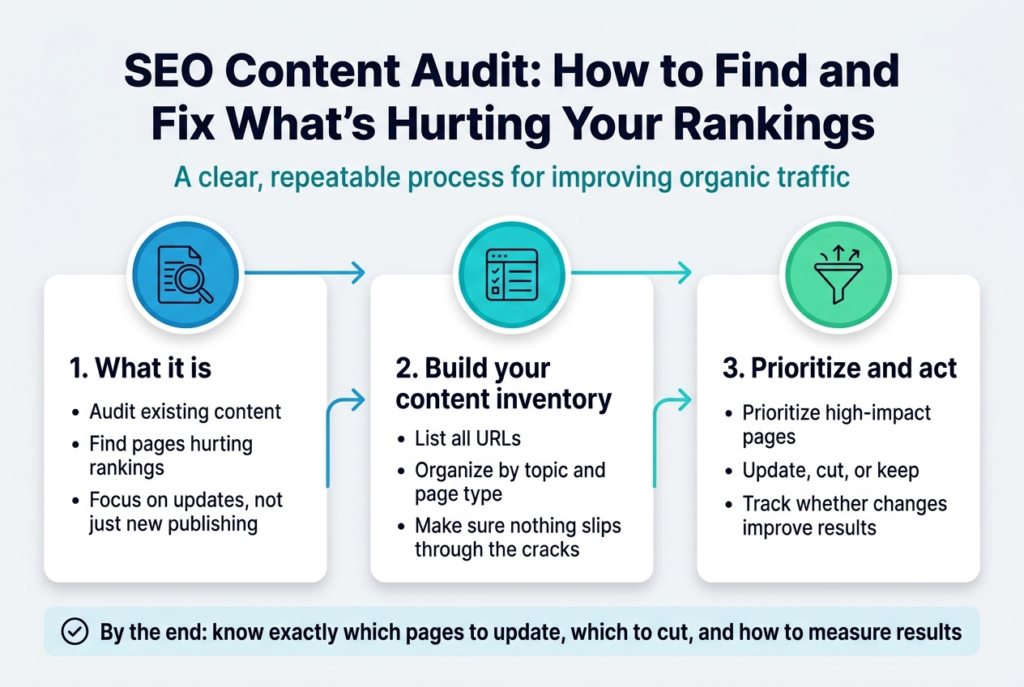
- What an SEO content audit actually is and why it matters more than publishing new content
- How to build and organize your content inventory so nothing slips through the cracks
- How to prioritize your findings and take action without getting overwhelmed by a mountain of URLs
By the end, you’ll know exactly which pages to update, which to cut, and how to track whether your changes are actually working.
Understanding What an SEO Content Audit Is
Define the Purpose and Goals of an SEO Content Audit
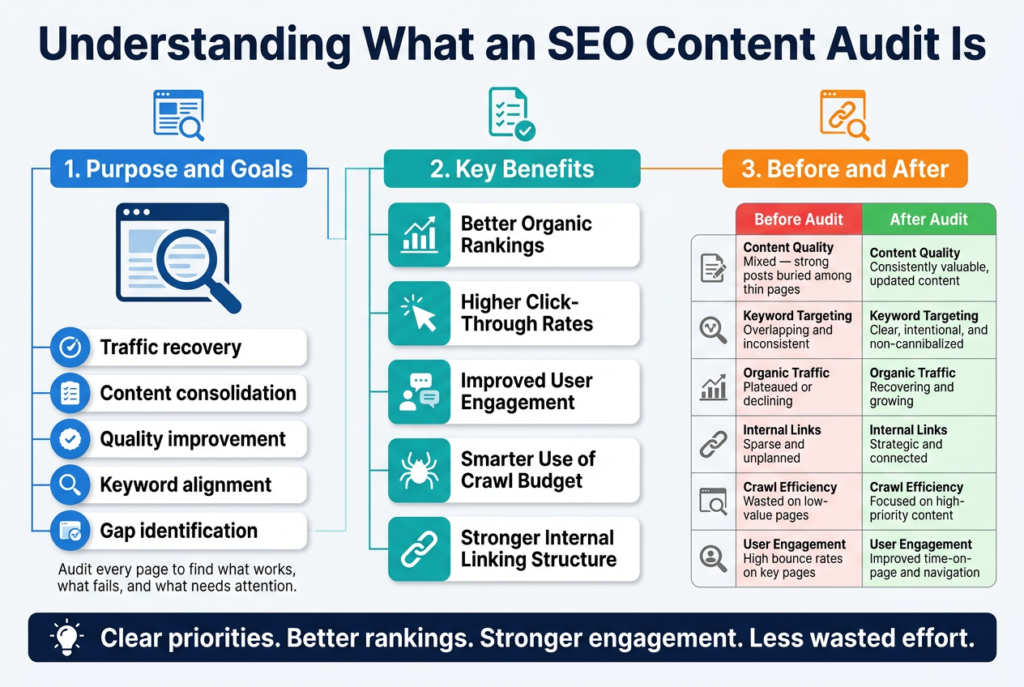
An SEO content audit is essentially a deep dive into every piece of content on your website — blog posts, landing pages, product descriptions, guides — to figure out what’s working, what’s failing, and what needs attention. Think of it like cleaning out your closet. You’re pulling everything out, taking a hard look at each item, and deciding whether to keep it, fix it, or toss it entirely.
The core purpose is to align your content with both search engine expectations and your audience’s actual needs. Over time, websites accumulate content that drifts off-strategy — old posts targeting the wrong keywords, pages with outdated information, or articles that cannibalize each other’s rankings. An audit surfaces all of that.
The goals typically fall into a few clear buckets:
- Traffic recovery — Finding pages that used to rank well but have slipped and figuring out why
- Content consolidation — Identifying overlapping topics and merging them into stronger, more authoritative pages
- Quality improvement — Spotting thin or low-value content that drags down your overall site authority
- Keyword alignment — Making sure your content actually targets search terms your audience is using right now
- Gap identification — Discovering topics your competitors are ranking for that you haven’t covered yet
A well-run audit gives you a clear, prioritized roadmap rather than a vague sense that “something needs fixing.” You come out the other side knowing exactly which pages to update first and why.
Identify the Key Benefits for Your Website’s Performance
Running a content audit delivers real, measurable improvements across multiple areas of your website’s SEO performance. Here’s a breakdown of the biggest wins you can expect:
Better Organic Rankings
Search engines reward websites that consistently publish accurate, relevant, and well-structured content. When you clean up low-quality pages and strengthen your best-performing ones, your overall domain authority gets a boost — and that rising tide lifts rankings across your entire site, not just the individual pages you touched.
Higher Click-Through Rates
An audit often reveals pages with strong impressions in search results but poor click-through rates. That’s usually a signal that the title tag or meta description isn’t doing its job. Fixing these during your audit can drive more traffic without changing a single ranking.
Improved User Engagement
When content is accurate, easy to read, and genuinely useful, people stay longer and explore more pages. Audits help you identify high-bounce-rate content and give you the data to understand whether the problem is the writing, the topic targeting, or something technical like page speed.
Smarter Use of Crawl Budget
Search engines only crawl a certain number of pages on your site within a given window. If a significant chunk of your content is thin, duplicate, or low-value, crawlers are spending time on pages that offer no SEO return. Removing or consolidating that content frees up crawl budget for your most important pages.
Stronger Internal Linking Structure
During an audit, you’ll naturally spot opportunities to connect related content more effectively. A stronger internal linking structure helps both users navigate your site and search engines understand the relationships between your pages.
Here’s a quick comparison of what your website looks like before and after a properly executed audit:
| Area | Before Audit | After Audit |
|---|---|---|
| Content Quality | Mixed — strong posts buried among thin pages | Consistently valuable, updated content |
| Keyword Targeting | Overlapping and inconsistent | Clear, intentional, and non-cannibalized |
| Organic Traffic | Plateaued or declining | Recovering and growing |
| Internal Links | Sparse and unplanned | Strategic and connected |
| Crawl Efficiency | Wasted on low-value pages | Focused on high-priority content |
| User Engagement | High bounce rates on key pages | Improved time-on-page and navigation |
Beyond the numbers, a content audit gives you something that’s hard to put a metric on: clarity. You stop guessing which content to create next because you already know what your existing content is missing, where the gaps are, and which improvements will move the needle fastest.
Gathering and Organizing Your Content Inventory
A. Collect Key Performance Metrics for Each Page
Before you can decide what to fix, keep, or delete, you need cold, hard data on how every piece of content is actually performing. Gut feelings have no place in a content audit — numbers do.
Start by pulling together a complete list of every URL on your site. Tools like Screaming Frog, Sitebulb, or even a simple XML sitemap crawl can help you generate that list fast. Drop everything into a spreadsheet — Google Sheets works perfectly fine for this.
Once you have your URL list, it’s time to layer in the metrics that actually tell a story.
The Core Metrics You Need
Here’s what to pull for each page and where to get it:
| Metric | What It Tells You | Where to Find It |
|---|---|---|
| Organic Traffic | How many people land on the page from search | Google Analytics / GA4 |
| Impressions & Clicks | How often the page shows up in search results | Google Search Console |
| Average Position | Where the page ranks for its target keywords | Google Search Console |
| Bounce Rate / Engagement Rate | Whether visitors stick around or leave immediately | Google Analytics / GA4 |
| Backlinks | How many external sites link to this page | Ahrefs, Semrush, Moz |
| Page Load Speed | How fast the page loads for users | Google PageSpeed Insights |
| Word Count | How in-depth the content is | Screaming Frog or manual check |
| Last Updated Date | When the content was last refreshed | CMS or crawl tool |
| Conversions | Whether the page actually drives business goals | Google Analytics Goals / Events |
Don’t Just Look at Traffic
Traffic alone is a misleading signal. A page can pull in thousands of visitors and still be a complete waste if none of them convert, engage, or move deeper into your site. Pair traffic data with engagement metrics like average time on page, scroll depth, and internal link clicks to get a real picture of how the content is working.
A page with 200 monthly visits but a 12% conversion rate is far more valuable than one with 5,000 visits and zero conversions.
Segment by Content Type
Once you have the raw data, sort your inventory by content type. Blog posts, landing pages, product pages, and resource guides all have different jobs to do and should be measured against different benchmarks.
For example:
- Blog posts — focus on organic traffic, keyword rankings, and backlinks
- Landing pages — prioritize conversion rate and bounce rate
- Product/service pages — watch for both rankings and revenue-driving metrics
- Resource or hub pages — look at internal link equity and time on page
Segmenting this way makes patterns obvious. You might notice your blog posts from 2019 have cratered in traffic while your evergreen resource pages are still pulling their weight. That insight shapes every decision you make next.
Set Up a Scoring System
Raw data is useful, but scoring each page creates a simple visual way to prioritize action. Build a basic scoring column in your spreadsheet that combines performance signals into a single score or rating.
A simple tiered system works well:
- High Performer — Strong traffic, good engagement, solid rankings
- Needs Optimization — Some traffic or rankings potential but underperforming
- Thin or Outdated — Low traffic, no rankings, stale content
- Consolidation Candidate — Overlaps heavily with another page (keyword cannibalization risk)
- Remove — Zero traffic, no backlinks, no business value
This scoring doesn’t have to be complicated. Even a simple 1–5 rating based on a handful of metrics gives you a working framework to make faster decisions during the action phase of your audit.
Watch for Data Gaps
Some pages may have incomplete data — especially older content that predates your current analytics setup, or pages blocked by noindex tags that aren’t showing up in Google Search Console. Flag these separately. Missing data is a finding in itself and often points to technical issues worth investigating.
Also check for pages that are indexed but receiving zero traffic. These “ghost pages” are common in larger sites and frequently fly under the radar. They dilute your overall site quality and may be dragging down your crawl budget at the same time.
Prioritizing and Taking Action on Audit Findings
A. Redirect or Remove Pages That Offer No SEO Value
Not every page on your website deserves to stay. Some pages are actively dragging down your overall site performance — thin content, duplicate articles, outdated landing pages, or posts that have never earned a single click in years. Once your audit reveals these underperformers, you have a few clear paths forward: redirect, consolidate, or delete.
Identifying Pages Worth Cutting
Before you start pulling the trigger on deletions, you need a clear picture of what qualifies as “no SEO value.” Here’s what to look for:
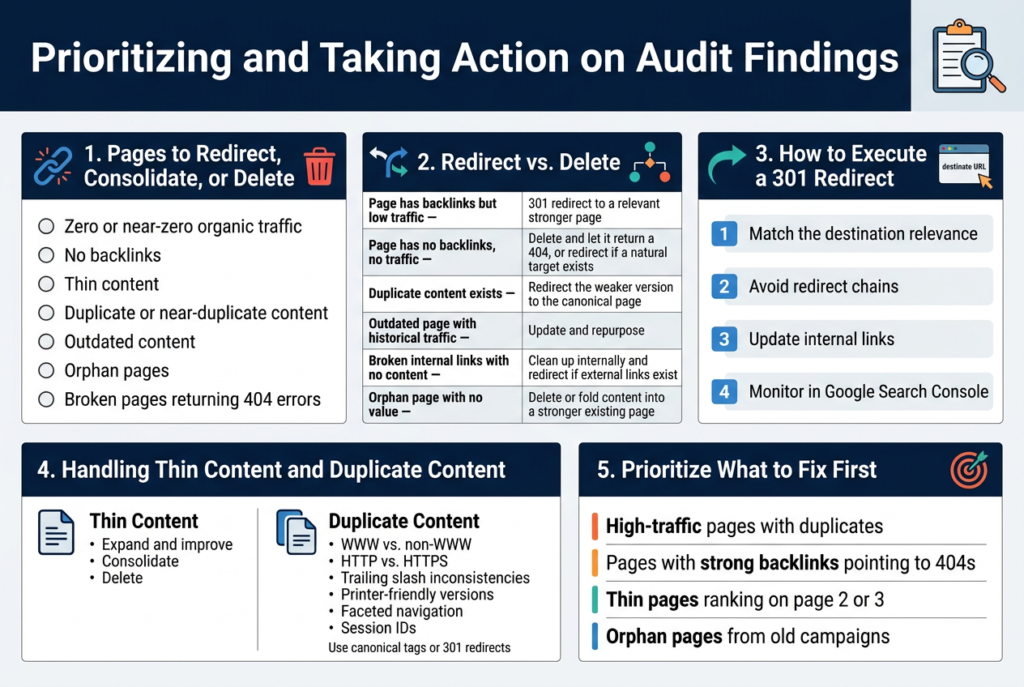
- Zero or near-zero organic traffic over the past 12 months
- No backlinks pointing to the page
- Thin content — pages with fewer than 300 words and nothing unique to offer
- Duplicate or near-duplicate content that cannibalizes rankings from a stronger page
- Outdated content that’s no longer accurate and can’t realistically be updated
- Orphan pages — pages that have no internal links pointing to them
- Broken pages returning 404 errors that were never properly handled
When to Redirect vs. When to Delete
The decision between redirecting and deleting depends largely on whether the page has any existing equity — even a small amount.
| Situation | Recommended Action |
|---|---|
| Page has backlinks but low traffic | 301 redirect to a relevant, stronger page |
| Page has no backlinks, no traffic | Delete and let it return a 404, or redirect if a natural target exists |
| Duplicate content exists | Redirect the weaker version to the canonical page |
| Outdated page with historical traffic | Update and repurpose rather than redirect or delete |
| Broken internal links with no content | Clean up internally and redirect if external links exist |
| Orphan page with no value | Delete or fold content into a stronger existing page |
How to Execute a 301 Redirect Properly
A 301 redirect signals to search engines that a page has permanently moved to a new location. Done right, it passes the majority of the original page’s link equity to the destination URL.
Here’s how to do it cleanly:
- Match the destination relevance — redirect to a page that closely matches the intent of the original. Sending users from a “best running shoes” page to your homepage is lazy and confusing.
- Avoid redirect chains — if Page A redirects to Page B, and Page B redirects to Page C, you’re losing equity at each hop. Audit your redirects regularly to flatten these chains.
- Update internal links — after setting up a redirect, go back and update all internal links pointing to the old URL. This helps crawlers and avoids unnecessary redirect hops.
- Monitor in Google Search Console — after a few weeks, check to see if the redirected pages have been dropped from the index and if the destination pages are picking up any ranking improvements.
Handling Thin Content Pages
Thin content pages are trickier than outright broken or empty pages. Sometimes they’re product pages with minimal descriptions, old blog posts that were rushed out years ago, or event pages that have long since passed.
Your options here:
- Expand and improve — if the topic still has search demand and the page has any existing authority, rewriting and expanding the content is almost always the better play.
- Consolidate — if you have five thin articles covering the same general topic, merge them into one comprehensive piece and redirect the others to it.
- Delete — if the content is genuinely irrelevant, outdated beyond repair, or serves no user intent, removal with a 301 redirect to the closest relevant page makes sense.
Cleaning Up Duplicate Content
Duplicate content confuses search engines about which version of a page to rank. It splits link equity and often results in neither version performing particularly well.
Common sources of duplicates include:
- WWW vs. non-WWW versions of the same URL
- HTTP vs. HTTPS pages still being accessible
- Trailing slash inconsistencies (example.com/page vs. example.com/page/)
- Printer-friendly versions of pages
- Faceted navigation on e-commerce sites generating endless URL variations
- Session IDs being appended to URLs
For each type, either canonical tags or 301 redirects are your best tools. Canonical tags tell search engines which version is the “master” without redirecting users. Redirects are better when the duplicate version has no reason to exist at all.
Prioritizing Which Pages to Act on First
With a large site, you can’t fix everything at once. Focus your energy where it matters most:
- High-traffic pages with duplicates — these are stealing ranking potential right now
- Pages with strong backlinks pointing to 404s — this is link equity you’re actively wasting
- Thin pages ranking on page 2 or 3 — these are close to breaking through and can often be improved quickly
- Orphan pages from old campaigns — these are easy wins that clean up site architecture with minimal effort
Working through your audit findings in order of potential impact means you start seeing results faster rather than spending weeks cleaning up pages that barely matter.
Measuring the Impact of Your Content Audit
Set Clear KPIs to Track Post-Audit Improvements
Running a content audit without tracking results is like going to the gym for three months and never stepping on a scale. You might be making progress, but you’d have no idea. Setting the right KPIs before and after your audit gives you a clear picture of what’s actually working.
Here are the core KPIs you should be watching:
- Organic traffic – How many sessions are coming from search engines to the pages you updated or consolidated?
- Keyword rankings – Are your target keywords climbing, holding steady, or still slipping?
- Bounce rate – Did your content improvements make visitors stick around longer?
- Average time on page – A solid indicator of whether your content is genuinely engaging after your rewrites.
- Conversion rate – Are readers taking action — signing up, downloading, buying — at a higher rate than before?
- Pages per session – Does your improved internal linking bring people deeper into your site?
- Backlinks – Are updated, higher-quality pages attracting more links over time?
A useful approach is to create a simple baseline document before you roll out any changes. Screenshot your current rankings, pull your traffic data from Google Analytics or GA4, and log your conversion numbers. This snapshot becomes your “before” picture, and you’ll thank yourself for having it when you start comparing results three months later.
| KPI | Tool to Track It | What Good Progress Looks Like |
|---|---|---|
| Organic Traffic | Google Analytics / GA4 | 10–30% increase within 3–6 months |
| Keyword Rankings | Ahrefs, Semrush, Google Search Console | Target keywords moving into top 10 |
| Bounce Rate | Google Analytics | Drop of 5–15 percentage points |
| Time on Page | Google Analytics | Increase of 30+ seconds |
| Conversion Rate | Google Analytics / CRM | Steady upward trend month-over-month |
| Backlinks | Ahrefs / Moz | New referring domains appearing |
Be realistic about timelines. Google doesn’t update rankings overnight. Give your changes at least 60–90 days before making any firm judgments about whether your audit paid off.
Monitor Ranking and Traffic Changes Over Time
Tracking KPIs is just the start. The real insight comes from watching how those numbers shift over weeks and months — and understanding why they’re moving.
Build a Simple Tracking Dashboard
You don’t need a complicated setup. A Google Looker Studio dashboard connected to Google Search Console and GA4 can show you everything in one place. Track your most important pages in a spreadsheet with monthly snapshots of:
- Position for primary keyword
- Clicks from search
- Impressions
- Click-through rate (CTR)
- Sessions from organic search
Update this sheet every 30 days. Over time, patterns become obvious. You’ll see which types of content updates deliver the biggest ranking gains and which pages might need a second round of work.
Watch for These Positive Signals
When your audit changes are working, you’ll usually notice:
- Impressions rising first – Google is showing your content to more people before clicks catch up
- CTR improving – Better title tags and meta descriptions you wrote during the audit are paying off
- Ranking jumps in waves – Positions often improve in clusters after Google crawls and recrawls your updated content
- Traffic from long-tail variants – Updated content often starts ranking for more keyword variations, not just your primary target
Spot Red Flags Early
Not every update produces wins. Keep an eye out for:
- Pages that dropped after your updates (check if you accidentally removed important content or changed URL structure without a redirect)
- A rise in impressions but flat or dropping clicks (your meta description might not match search intent)
- Traffic gains that plateau quickly (the content might need more depth or better backlinks to break through)
Run a Monthly Review Cycle
Set a recurring monthly reminder to review your post-audit data. A simple agenda helps:
- Pull ranking data for updated pages from Google Search Console
- Compare organic traffic month-over-month and year-over-year in GA4
- Note any pages that improved significantly — and study what worked
- Flag underperforming pages for a second optimization pass
- Document your findings in a running log so you have a clear record of what changed and when
Tracking results this way turns your content audit from a one-time project into an ongoing content improvement system. Each round of data gives you sharper instincts for what works with your audience and in your niche.
Conclusion
Running an SEO content audit might seem like a big task, but breaking it down into clear steps makes it completely manageable. From understanding what an audit actually involves, to pulling together your content inventory, acting on what you find, and tracking your results — each step builds on the last to help your content work harder for you.
The real payoff comes when you start seeing the numbers move — more traffic, better rankings, and content that actually connects with your audience. So don’t let your content just sit there. Pick a starting point, dig into your audit, and make the improvements that will keep your site growing over time.