

Introduction
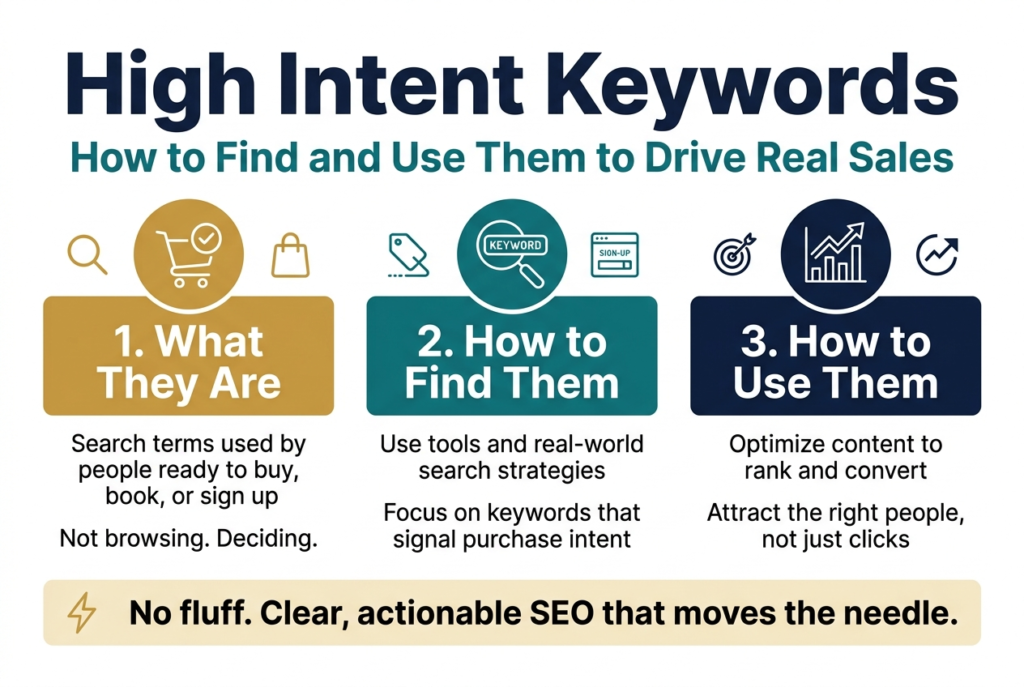
If you’ve been pouring time into SEO but still not seeing conversions, I’d bet the problem isn’t your content — it’s the keywords you’re targeting.
High-intent keywords are the search terms people type when they’re ready to buy, book, or sign up. They’re not browsing. They’re deciding. And once I started prioritizing these keywords over generic traffic-grabbers, my conversion rates shifted fast.
This guide is for marketers, business owners, and content creators who want their SEO efforts to actually move the needle — not just pull in clicks that go nowhere.
Here’s what I’ll walk you through:
- What high intent keywords are and why they’re the ones worth chasing
- How to find them using tools and strategies that work in the real world
- How to optimize your content so it ranks for these terms and converts the right people
No fluff, no vague advice — just a clear breakdown of what works and how to apply it to your business.
Understanding High Intent Keywords and Why They Matter
![Create a clean, professional full-bleed infographic illustration in a 3:2 aspect ratio, wide horizontal layout, with a modern SEO/marketing style, white background, navy and teal primary colors, orange accent highlights, subtle gray dividers, and bold sans-serif typography.
Top header across the full width:
Large bold title centered: "Understanding High Intent Keywords and Why They Matter"
Small subtitle beneath in gray: "Search intent, conversion potential, and how high intent differs from low intent"
Main layout: wide 3-section horizontal infographic with clear visual hierarchy and icons.
LEFT SECTION:
Heading in a teal banner: "1. What Are High Intent Keywords?"
Below it, a large magnifying glass icon with a shopping cart, phone, and location pin around it.
Include 3 bullet blocks with small orange check icons:
- "Decision-stage queries"
- "Action-driven language: buy, get, hire, book, download, near me"
- "Commercial or transactional focus"
Add a small callout box at the bottom with bold text: "Ready to act now"
CENTER SECTION:
Heading in a navy banner: "2. Why They Matter"
Show a funnel graphic from top to bottom with a dollar sign at the bottom and a conversion arrow.
Add 4 stacked metric cards with icons:
- "Higher conversion potential" with a target icon
- "Qualified traffic" with a user-plus icon
- "Higher CPC in paid search" with a coin icon
- "Shorter sales cycle and higher ROI" with a rising chart icon
Add a highlighted quote-style box: "High intent keywords connect directly to revenue"
RIGHT SECTION:
Heading in an orange banner: "3. High Intent vs Low Intent"
Place a clean side-by-side comparison table with two columns and colored headers.
Left column header: "High Intent Keywords"
Right column header: "Low Intent Keywords"
Rows with exact text:
- "Search Stage | Decision / Purchase stage | Awareness / Research stage"
- "User Goal | Take action | Learn or explore"
- "Example Query | buy running shoes online | how to choose running shoes"
- "Conversion Rate | High | Low"
- "Traffic Volume | Typically lower | Typically higher"
- "Content Type | Product pages, landing pages, service pages | Blog posts, guides, how-tos"
Use small icons beside the headers: shopping bag for high intent, book for low intent.
BOTTOM BAND across full width:
Heading: "4. Intent Categories and Keyword Signals"
Create four evenly spaced cards with icons and short text:
- Card 1 with info icon: "Informational (Low Intent)" and "what is content marketing"
- Card 2 with compass icon: "Navigational (Mixed Intent)" and "HubSpot login"
- Card 3 with comparison icon: "Commercial Investigation (Mid-to-High Intent)" and "best CRM software 2024"
- Card 4 with lightning bolt icon: "Transactional (High Intent)" and "sign up for HubSpot free trial"
Below the cards, add a horizontal arrow labeled "Journey from awareness to transaction"
BOTTOM RIGHT CALLOUT:
Small highlighted box with bold heading: "High Intent Signals"
List exact text with tiny icons:
- "Pricing terms: cost of, pricing, cheap, affordable"
- "Action words: buy, order, hire, get, schedule"
- "Location qualifiers: near me, in [city name]"
- "Comparison language: vs, alternative to, best option for"
- "Urgency signals: same day, instant, fast"
Visual style:
Use crisp vector illustration, flat design, subtle shadows, clean spacing, strong alignment, and easy-to-read text. Include small decorative arrows and funnel elements to connect the sections. Make the overall composition balanced, wide, and information-rich, with no vertical poster frame and no empty center.](https://gravitywrite.sgp1.digitaloceanspaces.com/blog/img_4450412_2026_06_26_18_22_04.jpg)
What Are High Intent Keywords and Why Do They Matter in Search Behavior
When someone types a search query into Google, they’re not just looking for random information — they have a specific goal in mind. That goal is what I call “search intent,” and high intent keywords are the phrases people use when they’re very close to taking action. We’re talking about buying something, signing up for a service, booking an appointment, or requesting a quote.
High intent keywords are the golden tickets of SEO and paid search. When I work with these keywords, I’m essentially meeting my potential customers at the exact moment they’re ready to pull the trigger. These aren’t people casually browsing — they’re people with their wallets out, fingers hovering over the “Buy Now” button.
Here’s how I think about their role in search behavior:
- Decision-stage queries — The searcher has already done their research and is now comparing options or ready to commit.
- Action-driven language — Words like “buy,” “get,” “hire,” “book,” “download,” or “near me” signal that the person wants to do something, not just learn something.
- Commercial or transactional focus — The query has a clear commercial purpose. The person isn’t asking “what is project management software?” They’re searching “best project management software for small teams” or “buy project management software.”
The reason high intent keywords matter so much to me is simple: conversion potential. When I target these keywords, I’m not just driving traffic — I’m driving qualified traffic. A visitor who lands on my page after searching “hire a personal injury lawyer in Chicago” is far more valuable than one who searched “what does a personal injury lawyer do.” Both are valid searchers, but only one is ready to pick up the phone.
High intent keywords also tend to have a higher cost-per-click in paid advertising, and there’s a very good reason for that. Advertisers are willing to pay more because the return on investment is significantly higher. The conversion rates are better, the sales cycle is shorter, and the customer lifetime value from these leads is often higher.
How High Intent Keywords Differ From Low Intent Keywords
I find that one of the biggest mistakes people make in their keyword strategy is treating all keywords the same way. Not every search query carries the same weight, and understanding the difference between high intent and low intent keywords changes everything about how I approach content and SEO.
Here’s a side-by-side comparison that makes this crystal clear:
| Feature | High Intent Keywords | Low Intent Keywords |
|---|---|---|
| Search Stage | Decision / Purchase stage | Awareness / Research stage |
| User Goal | Take action (buy, book, hire) | Learn or explore |
| Example Query | “buy running shoes online” | “how to choose running shoes” |
| Conversion Rate | High | Low |
| Traffic Volume | Typically lower | Typically higher |
| Competition | High (especially in paid search) | Moderate to low |
| Content Type | Product pages, landing pages, service pages | Blog posts, guides, how-tos |
| Sales Cycle Position | Bottom of the funnel | Top or middle of the funnel |
Low intent keywords are not bad — I want to be clear about that. They serve a completely different purpose. When I create content around low intent keywords, I’m building awareness, establishing trust, and nurturing people who will eventually become buyers. Think of it as planting seeds.
High intent keywords, on the other hand, are where I go to harvest what I’ve sown. These are the searches that directly connect to revenue.
Breaking It Down by Intent Category
I typically think of search intent in four buckets:
- Informational (Low Intent): “what is content marketing,” “how does email marketing work”
- Navigational (Mixed Intent): “HubSpot login,” “Nike official store” — the user knows where they want to go
- Commercial Investigation (Mid-to-High Intent): “best CRM software 2024,” “Mailchimp vs. ActiveCampaign” — still researching but getting close
- Transactional (High Intent): “sign up for HubSpot free trial,” “buy Nike Air Max size 10” — ready to act right now
When I look at this breakdown, I see a clear journey. The user starts with informational searches and gradually moves toward transactional ones. My job is to show up at every stage, but I pay close attention — and often dedicate more budget — to the transactional and commercial investigation categories because that’s where conversions happen.
The key difference I always come back to is urgency and specificity. High intent keywords are specific. They include modifiers like:
- Pricing terms: “cost of,” “pricing,” “cheap,” “affordable”
- Action words: “buy,” “order,” “hire,” “get,” “schedule”
- Location qualifiers: “near me,” “in [city name]”
- Comparison language: “vs,” “alternative to,” “best option for”
- Urgency signals: “same day,” “instant,” “fast”
When I spot these signals in a keyword, I know I’m looking at high intent — and I treat that keyword with the attention it deserves.
Identify the Types of High Intent Keywords That Boost Sales
A. Use Commercial Investigation Keywords to Target Comparison Shoppers
When someone types “best CRM software for small business” or “HubSpot vs Salesforce,” they are not just browsing. They are actively comparing options before pulling out their credit card. These are commercial investigation keywords, and they are some of my favorite types of high intent keywords to target because they catch buyers at a critical decision-making moment.
Here’s what I’ve noticed: comparison shoppers are warm leads. They already know they need a solution. They just haven’t decided which one yet. If my content shows up right when they’re weighing their options, I have a real shot at winning that sale.
Types of Commercial Investigation Keywords I Look For
- “Best [product/service] for [specific use case]” — e.g., “best email marketing tool for eCommerce”
- “[Brand A] vs [Brand B]” — e.g., “Mailchimp vs Klaviyo”
- “[Product] review” — e.g., “Ahrefs review 2024”
- “Top [number] [product category]” — e.g., “top 5 project management tools”
- “[Product] alternatives” — e.g., “Shopify alternatives for dropshipping”
- “Is [product] worth it?” — classic hesitation-based search
Each of these signals that someone is close to buying. They’re doing their homework, and I want my content to be the thing that finishes that homework for them.
How I Approach Commercial Investigation Content
My goal with this type of content is to be genuinely helpful, not just promotional. I build detailed comparison pages, honest review posts, and side-by-side breakdowns that actually answer the questions buyers are asking. When I’m transparent about pros and cons, readers trust me more, and that trust converts.
Here’s a quick breakdown of how I match content format to commercial investigation keyword types:
| Keyword Type | Best Content Format |
|---|---|
| “[Brand A] vs [Brand B]” | Side-by-side comparison article |
| “Best [product] for [audience]” | Curated listicle with in-depth mini-reviews |
| “[Product] review” | Long-form, detailed review with screenshots |
| “[Product] alternatives” | Comparison table + individual breakdowns |
| “Is [product] worth it?” | Honest pros/cons deep dive |
One thing I always do is include a clear recommendation. Wishy-washy content doesn’t convert. Buyers want someone to just tell them what to pick. When I commit to a recommendation (backed by real reasoning), my pages perform significantly better in both rankings and conversions.
I also make sure my meta titles and H1s include the exact phrasing people are searching. If someone searches “best accounting software for freelancers,” my page title should mirror that language as closely as possible.
B. Maximize Local Intent Keywords to Attract Nearby Customers
If I run a local business or serve customers in a specific geographic area, local intent keywords are hands-down one of the highest-converting keyword categories I can target. These are searches where someone is looking for a product or service near them, right now.
Think about how you search when you need something urgently. You type “emergency plumber near me” or “coffee shop open now in Austin.” That “near me” or the city name tells me everything: this person is ready to show up or pick up the phone.
Common Local Intent Keyword Patterns
- “[Service] near me” — e.g., “HVAC repair near me”
- “[Service] in [City]” — e.g., “personal injury lawyer in Chicago”
- “[Service] + [neighborhood or zip code]” — e.g., “yoga studio in Brooklyn Heights”
- “Best [service] in [city]” — e.g., “best Thai restaurant in Nashville”
- “[Service] open now” — e.g., “urgent care open now”
- “Affordable [service] [city]” — e.g., “affordable dentist Houston”
What I love about these keywords is the urgency built right into them. Someone searching “emergency locksmith near me” is not doing research for next month. They need help right now. That’s about as high-intent as it gets.
My Strategy for Ranking Local Intent Keywords
1. Optimize My Google Business Profile First
Before I even think about my website, I make sure my Google Business Profile (formerly Google My Business) is complete and optimized. This means:
- Accurate name, address, and phone number (NAP)
- Selecting the right primary and secondary categories
- Adding photos regularly
- Collecting and responding to reviews
- Using the “Posts” feature to share updates and offers
A strong Google Business Profile is what gets me into the local map pack — the three listings that appear in map format at the top of local search results. That placement drives a massive volume of calls and clicks.
2. Build Location-Specific Landing Pages
If I serve multiple cities or neighborhoods, I build dedicated landing pages for each location. Each page targets keywords specific to that area, like “roof replacement in Scottsdale” versus “roof replacement in Tempe.” I don’t just swap out the city name and call it done — I make sure each page has unique, relevant content, local testimonials, and references to area-specific context where it makes sense.
3. Get Local Citations Right
I make sure my business name, address, and phone number are consistent across directories like Yelp, Bing Places, Apple Maps, and industry-specific directories. Inconsistencies across these listings confuse search engines and can hurt my local rankings.
4. Use Location Modifiers in On-Page SEO
On every location page, I naturally work the location into:
- The page title and meta description
- The H1 and at least one or two subheadings
- The first paragraph of content
- Image alt text
- The URL slug
Here’s a simple table showing how I structure location-specific keyword targeting across different page elements:
| Page Element | Example for a Plumber in Denver |
|---|---|
| Page Title | “Emergency Plumber in Denver, CO — Available 24/7” |
| Meta Description | “Need a reliable plumber in Denver? We offer same-day service…” |
| H1 | “Trusted Plumbing Services in Denver, Colorado” |
| URL Slug | /plumber-denver-co |
| Image Alt Text | “Licensed plumber fixing pipe in Denver home” |
5. Earn Local Backlinks
I reach out to local news sites, community blogs, and regional business associations to earn backlinks that signal local relevance. A mention from a Denver community website tells Google I’m genuinely part of that local ecosystem — and that carries real weight.
Local intent keywords may have smaller search volumes compared to broad national terms, but they convert at a much higher rate because the person searching is in the market right now, in my area. For any business with a physical presence or a defined service region, these keywords belong at the top of my targeting list.
Proven Strategies to Find High Intent Keywords for Your Business
![Full-bleed horizontal infographic illustration in 3:2 aspect ratio, clean modern marketing style, white background with navy, teal, blue, and gold accent colors, bold sans-serif fonts, clear visual hierarchy, professional business look.
Top header spanning full width: large bold title in dark navy, text exactly: "Proven Strategies to Find High Intent Keywords for Your Business". Under title, a smaller teal subtitle banner with text exactly: "Analyze Competitor Keywords to Gain a Competitive Edge".
Main layout: five wide horizontal sections arranged in a 2-row grid with multi-column blocks, not a vertical stack. Use numbered circles and simple flat icons for each section.
Section 1 on upper left, blue block with magnifying glass and website icons:
Title text: "1. Identify Your Real Competitors"
Bullets:
"Search for buying-stage terms"
"Find who ranks in Google"
"Focus on true search competitors"
Small tool chips beneath: "Ahrefs", "SEMrush", "Moz", "Ubersuggest"
Section 2 on upper center-right, teal block with page and cursor icons:
Title text: "2. Dig Into Their Top-Performing Pages"
Bullets:
"Product comparison pages"
"Pricing pages"
"Best-of roundup pages"
Small callout labels with icons: "Page titles + meta descriptions", "H1 + H2 headings", "CTA language: Get a Quote, Start Free Trial, Shop Now"
Section 3 across middle left, gold block with keyword list icon:
Title text: "3. Run a Keyword Gap Analysis"
Show a clean 3-column mini table with headers exactly: "Keyword Type", "What It Signals", "Priority Level"
Rows exactly:
"Buy [product] online" | "Direct purchase intent" | "High"
"[Product] vs [Product]" | "Comparison/decision stage" | "High"
"Best [product] for [use case]" | "Research close to purchase" | "High"
"[Brand] alternatives" | "Switching intent" | "Medium-High"
"[Product] reviews" | "Trust-building before buying" | "Medium"
"How to use [product]" | "Post-purchase or awareness" | "Low"
Section 4 across middle right, dark blue block with ad megaphone and dollar icon:
Title text: "4. Look at Their Paid Keywords Too"
Bullets:
"Check Google Ads bidding terms"
"Paid keywords often convert"
"Higher CPC = higher commercial intent"
Small label chip: "Filter by estimated CPC"
Section 5 on bottom left-to-center, teal and navy split block with upward arrow and trophy icon:
Title text: "5. Don't Just Copy — Improve"
Bullets:
"Fill content gaps"
"Add trust signals"
"Target more specific long-tail keywords"
Bottom statement in a highlighted banner:
"Competitor keyword research isn't about playing catch-up. It's about finding the opportunity and showing up with something better."
Add a thin bottom footer strip across full width with a final punchline in bold:
"Turn their research into your rankings."
Use subtle arrow connectors between sections, simple line icons, light shadowed cards, ample spacing, crisp readable text, polished infographic layout, no frame, no mockup, no people, no photos.](https://gravitywrite.sgp1.digitaloceanspaces.com/blog/img_4450412_2026_06_26_18_28_47.jpg)
Analyze Competitor Keywords to Gain a Competitive Edge
One of the smartest moves I make when hunting for high intent keywords is going straight to what my competitors are already ranking for. Think about it — they’ve already done a chunk of the legwork. Why start from scratch when you can build on proven data?
Here’s how I approach competitor keyword analysis step by step:
Step 1: Identify Your Real Competitors
Not every business in your niche is actually your competitor when it comes to search. I focus on the ones showing up in Google for the same buying-stage searches I’m targeting. A quick search for your core product or service terms will reveal who’s fighting for the same traffic.
I also use tools like:
- Ahrefs – to plug in a competitor’s domain and pull their top-ranking pages
- SEMrush – to run a gap analysis between my site and theirs
- Moz – to identify keyword opportunities I might be missing
- Ubersuggest – a budget-friendly option that still delivers solid competitive data
Step 2: Dig Into Their Top-Performing Pages
Once I’ve got my competitor list, I look at which pages are driving the most organic traffic for them. These pages almost always cluster around high intent keyword clusters — things like product comparison pages, pricing pages, or “best [product]” roundups.
I pay close attention to:
- Page titles and meta descriptions — these often contain the exact keywords they’re targeting
- H1 and H2 headings — a goldmine for spotting intent-driven terms
- CTA language — words like “Get a Quote,” “Start Free Trial,” or “Shop Now” signal buyer-ready content
Step 3: Run a Keyword Gap Analysis
This is where things get really interesting. A keyword gap analysis shows me keywords my competitors rank for that I don’t — yet. I treat this list like a shopping cart of opportunities.
Here’s a simple breakdown of how I categorize what I find:
| Keyword Type | What It Signals | My Priority Level |
|---|---|---|
| “Buy [product] online” | Direct purchase intent | High |
| “[Product] vs [Product]” | Comparison/decision stage | High |
| “Best [product] for [use case]” | Research close to purchase | High |
| “[Brand] alternatives” | Switching intent | Medium-High |
| “[Product] reviews” | Trust-building before buying | Medium |
| “How to use [product]” | Post-purchase or awareness | Low |
I prioritize anything in the high and medium-high buckets because those searchers are already mentally close to pulling out their wallet.
Step 4: Look at Their Paid Keywords Too
Here’s a trick I swear by — checking what a competitor is bidding on in Google Ads. If a business is paying money to show up for a keyword, that keyword is almost certainly converting for them. Paid keyword data is like a cheat code for identifying high intent terms without guessing.
In SEMrush or Ahrefs, I can filter specifically for a competitor’s paid search terms and sort by estimated CPC. Higher CPC = higher commercial intent, almost every time.
Step 5: Don’t Just Copy — Improve
Once I’ve built my target keyword list from competitor research, I don’t just replicate what they’re doing. I look for gaps in their content quality, angles they haven’t covered, or search intent they’ve partially missed. That’s where I can create something that genuinely outperforms them.
A few questions I ask myself:
- Are their pages thin on detail or real-world examples?
- Are they missing trust signals like reviews, case studies, or data?
- Could I target a more specific version of their keyword (like a long-tail variation) and rank faster?
Competitor keyword research isn’t about playing catch-up. When I do it right, it’s about spotting where the opportunity is and showing up with something better. That’s how I turn their research into my rankings.
Optimize Your Content to Rank for High Intent Keywords
Craft Compelling Landing Pages That Match Searcher Intent
When someone types a high intent keyword into Google, they’re not just browsing — they’re ready to act. If my landing page doesn’t immediately speak to what they’re looking for, they’ll bounce faster than I can say “conversion rate.” Matching searcher intent isn’t just a nice-to-have; it’s the whole game.
What “Matching Intent” Actually Means
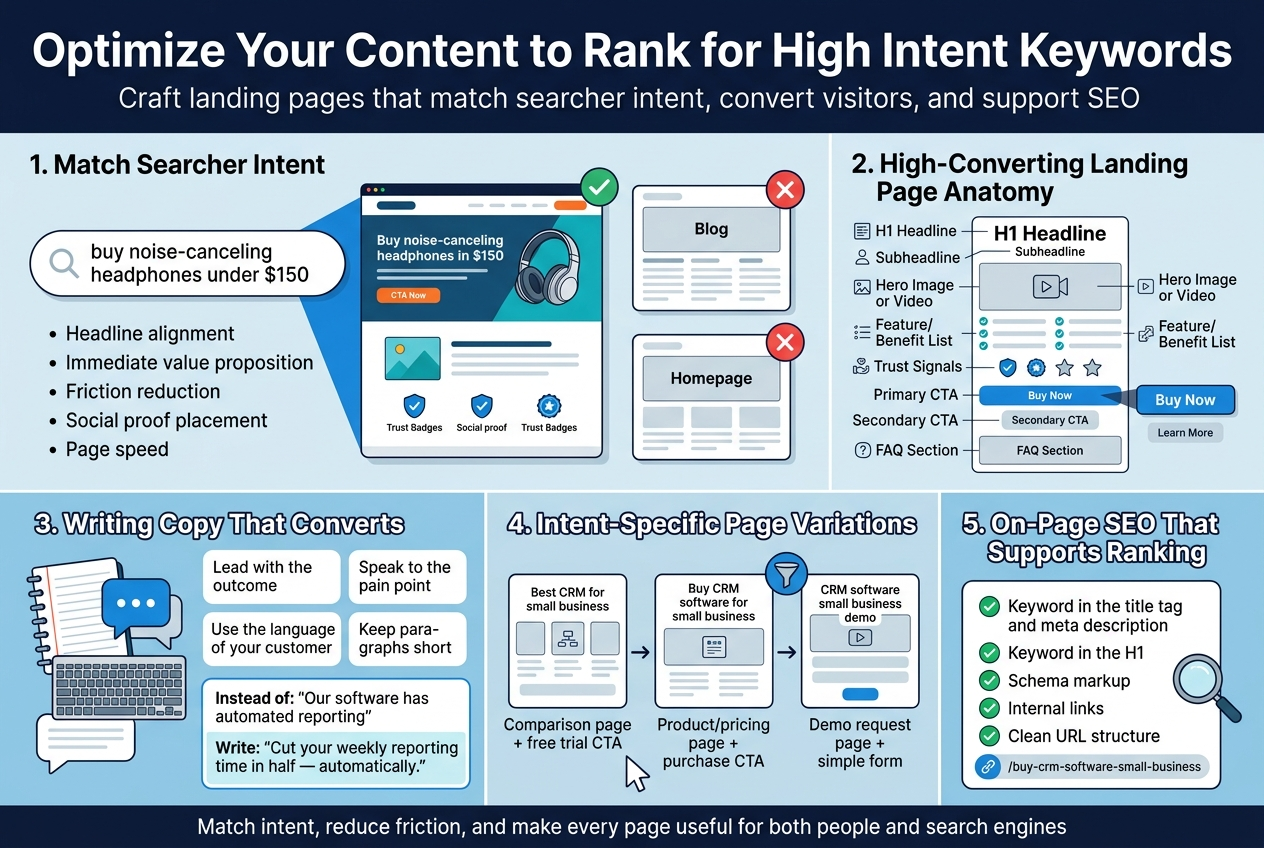
I think of it this way: the searcher has a specific expectation in their mind before they even click. If someone searches “buy noise-canceling headphones under $150,” they want to land on a page that shows them exactly that — not a general blog post about headphone types or a homepage with a generic hero banner.
My job is to make sure the moment they land on my page, they feel like they’re in exactly the right place. Every element — the headline, the subheading, the imagery, the CTA — should confirm that feeling.
Here’s what I always check before publishing a landing page targeting high intent keywords:
- Headline alignment: Does my H1 echo or closely reflect the keyword phrase the user searched?
- Immediate value proposition: Within the first few seconds, can the visitor clearly see what I’m offering and why it solves their problem?
- Friction reduction: Am I asking for too much too soon? A 10-field form on a first visit is a conversion killer.
- Social proof placement: Testimonials, reviews, and trust badges near the CTA can make or break the decision for a buyer who’s on the fence.
- Page speed: A slow page is a dead page. I always run my landing pages through Google PageSpeed Insights before launch.
The Anatomy of a High-Converting Landing Page for Buyers
I’ve built a lot of landing pages over the years, and the ones that consistently perform well for high intent keywords share a predictable structure. Here’s what I personally stick to:
| Page Element | What It Should Do |
|---|---|
| H1 Headline | Directly mirrors the keyword intent and hooks the reader immediately |
| Subheadline | Expands on the headline with a clear benefit statement |
| Hero Image or Video | Visually confirms what the product or service looks like in use |
| Feature/Benefit List | Short bullet points that speak to outcomes, not just specs |
| Trust Signals | Reviews, star ratings, certifications, or logos of known clients |
| Primary CTA | One clear action — buy, book, download, sign up |
| Secondary CTA | A softer option for people not quite ready (like “learn more” or “see demo”) |
| FAQ Section | Tackles the objections I know buyers have at this stage |
Writing Copy That Converts High Intent Visitors
The biggest mistake I see on landing pages targeting buyer-ready keywords is generic copy. Phrases like “We offer top-quality solutions for all your needs” say nothing and convince no one. When someone is ready to buy, they want specifics.
Here’s how I approach the copy:
- I lead with the outcome, not the feature. Instead of “Our software has automated reporting,” I write “Cut your weekly reporting time in half — automatically.”
- I speak to the pain point directly. If they’re searching for a solution, something isn’t working for them right now. I acknowledge that upfront.
- I use the language of my customer. I pull exact phrases from customer reviews, support tickets, and sales call recordings. Real language from real buyers always outperforms corporate-sounding copy.
- I keep paragraphs short. Online readers scan first, then read. Dense walls of text send them scrolling past — or away.
Intent-Specific Page Variations
One thing I’ve started doing that’s made a real difference is creating separate landing pages for closely related but intent-different keywords. For example:
- “Best CRM for small business” → Comparison-focused page with a feature table and a free trial CTA
- “Buy CRM software for small business” → Direct product/pricing page with a strong purchase CTA
- “CRM software small business demo” → Demo request page with a simple form and a benefit-driven headline
Even though all three keywords are high intent, the specific type of intent shifts slightly. Someone wanting a “demo” isn’t ready to buy yet — but they’re close. Someone searching “buy” is already there. Treating them the same way leaves money on the table.
On-Page SEO That Supports Your High Intent Targeting
Getting the user experience right is step one. Making sure Google can find and rank the page is step two. Here’s what I always make sure is in place:
- Keyword in the title tag and meta description — not forced, but natural
- Keyword in the H1 — exactly or with a close variation
- Schema markup — especially product schema, review schema, or FAQ schema depending on the page type
- Internal links — I link to the landing page from relevant blog posts and category pages to pass authority to it
- Clean URL structure — something like
/buy-crm-software-small-businessrather than/page?id=4872
The page has to earn its ranking by being genuinely useful and well-structured — not by stuffing the keyword in seventeen times. Google is smart enough to know the difference, and so are my visitors.
Measure the Performance of Your High Intent Keyword Strategy
Track Conversion Rates to Evaluate Keyword Effectiveness
Once I’ve built out my high intent keyword strategy and published content, the real work begins — figuring out what’s actually working. Tracking conversion rates is the single most important thing I do to understand whether my keywords are pulling their weight.
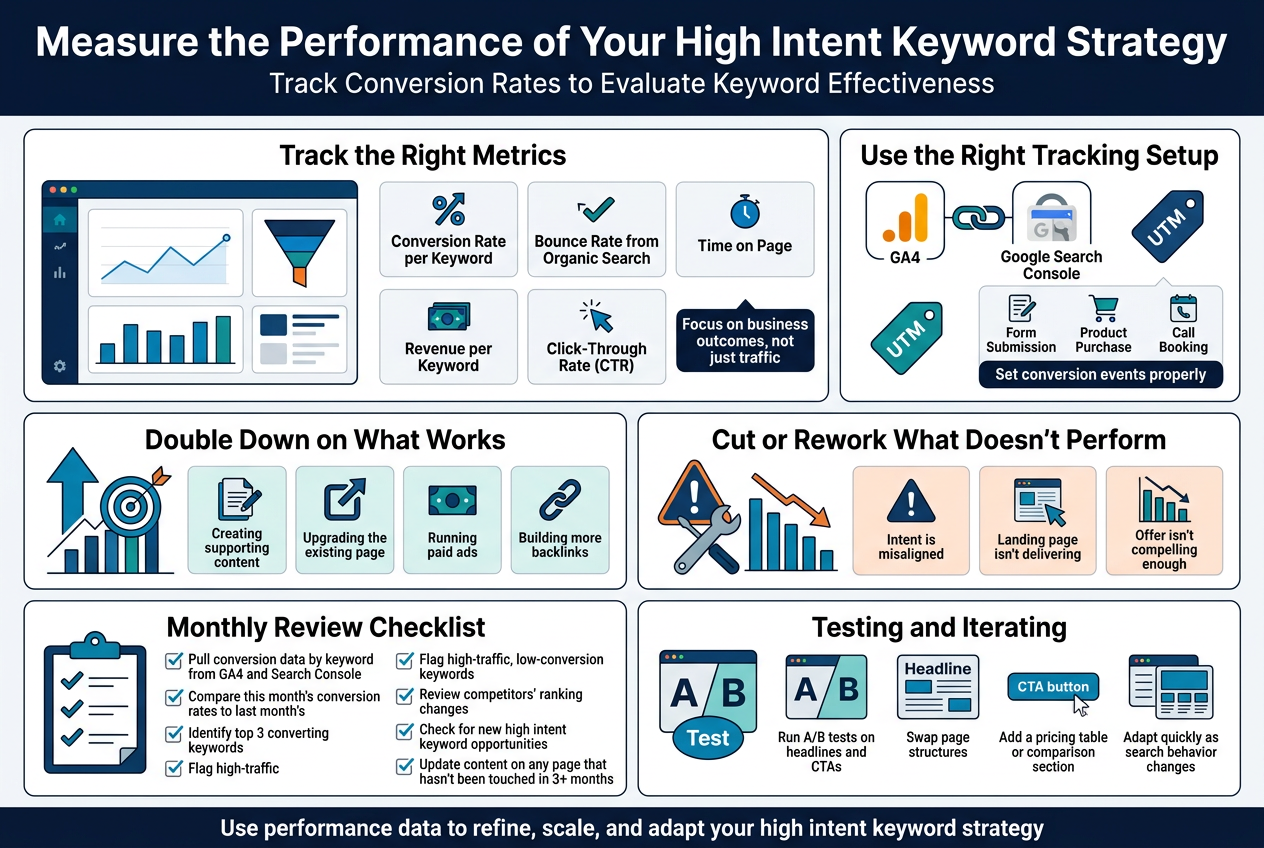
I start by connecting my keyword data to actual business outcomes. Traffic numbers feel good, but they mean nothing if visitors aren’t converting into leads, sign-ups, or paying customers. Here’s what I keep a close eye on:
- Keyword-level conversion rate — which specific keywords are driving people who actually buy
- Landing page conversion rate — how well each page converts visitors coming from high intent searches
- Cost per conversion (for paid campaigns) — am I spending smartly on the keywords that deliver ROI?
- Assisted conversions — sometimes a keyword plays a role earlier in the journey before a final sale
I use Google Analytics 4 alongside Google Search Console to match search queries with goal completions. Setting up conversion events properly is non-negotiable here. If I don’t define what a conversion looks like — a form submission, a product purchase, a call booking — I’m flying blind.
Here’s a quick breakdown of the metrics I track and what they tell me:
| Metric | What It Tells Me |
|---|---|
| Conversion Rate per Keyword | Whether that keyword attracts buyers or just browsers |
| Bounce Rate from Organic Search | If my landing page matches the searcher’s intent |
| Time on Page | Whether visitors are engaging with my content |
| Revenue per Keyword | The direct business value of ranking for that term |
| Click-Through Rate (CTR) | If my title and meta description resonate with high intent searchers |
I also segment my data by device, location, and new vs. returning visitors. A keyword might convert well on desktop but tank on mobile — and I’d never catch that without digging into the segments.
Using UTM Parameters for Precise Tracking
One thing I never skip is adding UTM parameters to any campaign-specific URLs. When I’m running paid ads targeting high intent keywords, UTMs let me trace conversions back to the exact keyword, ad group, and campaign. Without this, I’m just guessing where my best results come from.
Adjust Your Strategy Based on Data-Driven Insights
After I’ve collected enough performance data — usually after at least 30 to 60 days — I sit down and look at the numbers honestly. No emotional attachment to keywords I personally like. The data tells the real story, and I follow it.
Doubling Down on What Works
When I spot keywords with strong conversion rates and solid traffic, my first move is to invest more in them. That might mean:
- Creating supporting content — building topic clusters around the high-performing keyword
- Upgrading the existing page — adding testimonials, stronger CTAs, better visuals, or FAQs to push conversions even higher
- Running paid ads on organic keywords that are already converting well, to capture even more of that audience
- Building more backlinks to the pages ranking for those keywords to strengthen their positions
Cutting or Reworking What Doesn’t Perform
I’m not sentimental about underperforming keywords. If a keyword is driving traffic but nobody’s converting, one of a few things is usually happening:
- The intent is misaligned — the keyword sounds high intent but actually attracts people who are still in research mode
- The landing page isn’t delivering — the content doesn’t match what the searcher expected to find
- The offer isn’t compelling enough — my CTA, pricing, or value proposition needs work
Depending on the diagnosis, I either rework the content angle, adjust the page design, sharpen the CTA, or — if the keyword is fundamentally the wrong fit — I shift my focus elsewhere.
My Monthly Review Checklist
Here’s what a regular strategy review looks like for me:
- Pull conversion data by keyword from GA4 and Search Console
- Compare this month’s conversion rates to last month’s
- Identify top 3 converting keywords and plan how to scale them
- Flag any high-traffic, low-conversion keywords for content revision
- Review competitors’ ranking changes on my target keywords
- Check for new high intent keyword opportunities based on emerging search trends
- Update content on any page that hasn’t been touched in 3+ months
Testing and Iterating
I treat my keyword strategy like a living thing. I run A/B tests on headlines and CTAs for pages targeting high intent terms. I swap out page structures to see if a different layout converts better. Small tweaks — like adding a pricing table or a comparison section — can move conversion rates dramatically on pages targeting commercial or transactional keywords.
The biggest mistake I see people make is setting up a keyword strategy and then walking away. The search landscape shifts constantly. New competitors show up, search behavior changes, and Google adjusts how it interprets intent. Staying on top of my performance data and being willing to adapt quickly is what separates a strategy that keeps delivering results from one that quietly fades out.
Conclusion
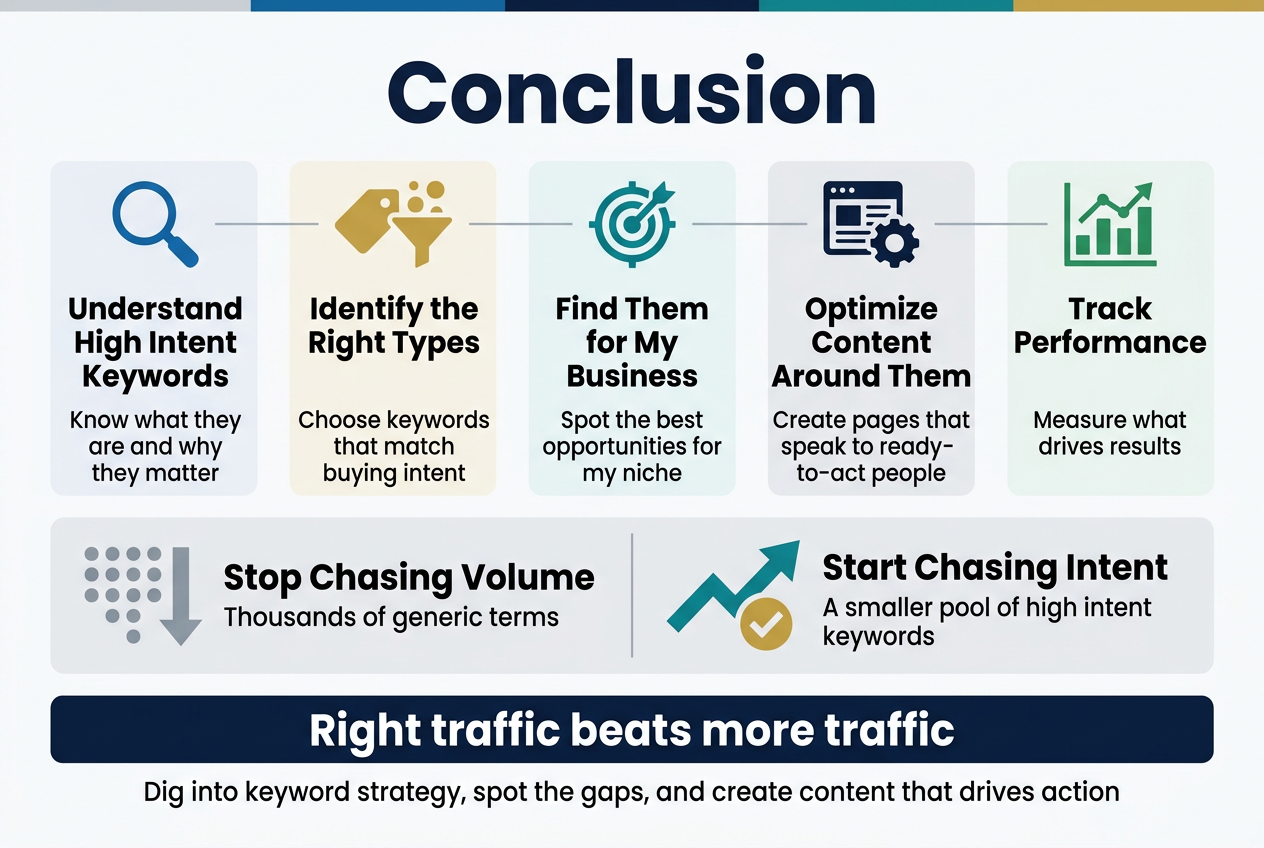
High intent keywords are the backbone of any strategy that actually drives results. From understanding what they are and why they matter, to identifying the right types, finding them for my specific business, optimizing my content around them, and tracking how well they perform — every step plays a role in turning casual browsers into real buyers. When I get this right, I’m not just pulling in traffic; I’m pulling in the right traffic.
My biggest takeaway? Stop chasing volume and start chasing intent. A smaller pool of high intent keywords will do more for my bottom line than thousands of generic terms ever could. So, if I haven’t already, now is the time to dig into my keyword strategy, spot the gaps, and start creating content that speaks directly to people who are ready to take action. The results might just surprise me.

One Response